

评论
.png "英寸模式支持。 #168")
贡献者
|
如果它也转换探测增量,甚至宏的增量,那也很好。 |
合作者
|
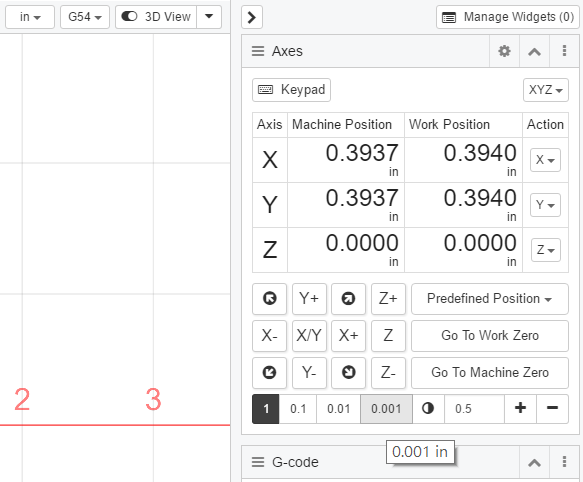
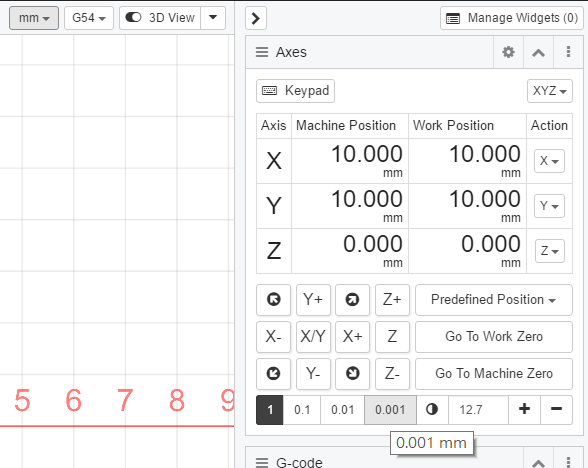
对于您的第一个问题,有一个鼠标悬停工具提示,显示增量按钮的当前单位。在 G20(英寸)和 G21(毫米)之间切换时,将更新用户输入值。例如,0.5 英寸 <-> 12.7 毫米。 G20英寸模式
G21 毫米模式
我可以在数字旁边添加单位,以便用户可以看到。 二、CNCjs中Grbl控制器和TinyG控制器的一些区别:
'gcode:stop': () => {
    this.event.trigger('gcode:stop');
    this.workflow.stop();
    const activeState = _.get(this.state, 'status.activeState', '');
    const delay = 500; // 500ms
    if (activeState === GRBL_ACTIVE_STATE_RUN) {
        this.write(socket, '!'); // hold
    }
    setTimeout(() => {
        this.write(socket, '\x18'); // ctrl-x
    }, delay);
}
'gcode:stop': () => {
    this.event.trigger('gcode:stop');
    this.workflow.stop();
    this.writeln(socket, '!%'); // feedhold and queue flush
    setTimeout(() => {
        this.writeln(socket, '{clear:null}');
        this.writeln(socket, '{"qr":""}'); // queue report
    }, 250); // delay 250ms
}
你的建议很好,我可以添加配置选项,允许用户在运行文件后指定首选单位。例如: |
合作者
@AustinSaintAubin |
.png "英寸模式支持。 #168")
作者
|
这看起来很棒 Cheton。谢谢! |
合作者
|
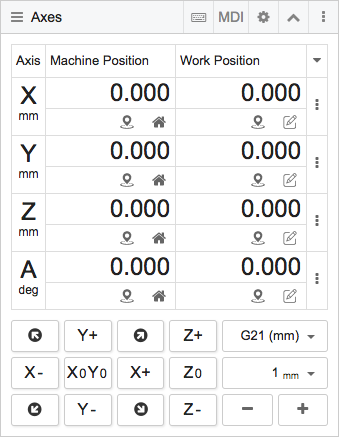
对 CNCjs 1.9.13 中的轴小部件进行了一些改进,您将知道当前使用的单位。
|




使用 Windows 7 和连接到 TinyG 的 CNCJS 桌面版本 1.9.5。
在英寸/毫米模式之间切换时,如果 UI 会通过将当前单位转换为新单位来更改点动增量值,那就太好了。
当我启动 CNCJS 并点动时,单位为毫米。使用 G20(英寸单位)运行文件后,默认单位为英寸。使用“1”按钮慢跑一步实际上移动 1 英寸而不是 1 毫米。
我想另一种方法是在运行可能切换单位的文件后将 GUI 返回到选定的单位。