Contact me: hankecnc@gmail.com

无法进入开发模式 #332

推推 grbl 3年前 (2023-02-02) 209次浏览
关闭
9 个任务中的第 4 个
Thrillz 打开了这个问题 2018 年 5 月 21 日 · 20条评论
关闭
9 个任务中的第 4 个

无法进入开发模式#332

Thrillz 打开了这个问题 2018 年 5 月 21 日 · 20条评论

注释

无法进入开发模式 #332
快感 评论了 2018 年 5 月 21 日  

描述

我使用文档中提到的 npm 方法安装了 cncjs。我想添加一个用于自动更改工具的自定义小部件,并按照小部件样板上的说明进行操作,当我运行“npm run dev”时,我总是会收到此错误。我什至无法在“node_modules > cncjs”中找到“src”目录,我究竟在哪里可以找到它?

版本

  • CNCjs:1.9.15
  • 节点.js:8.11.2
  • NPM:5.6.0

你如何安装CNCjs?

  • NPM
  • 下载 CNCjs 桌面应用程序

数控系统

  • [] 格布
  • 冰沙
  • TinyG/g2核心

硬件

  • [] 树莓派
  • 台式机或笔记本电脑
  • 移动设备

操作系统

  • [] 不适用
  • 视窗
  • 苹果
  • Linux
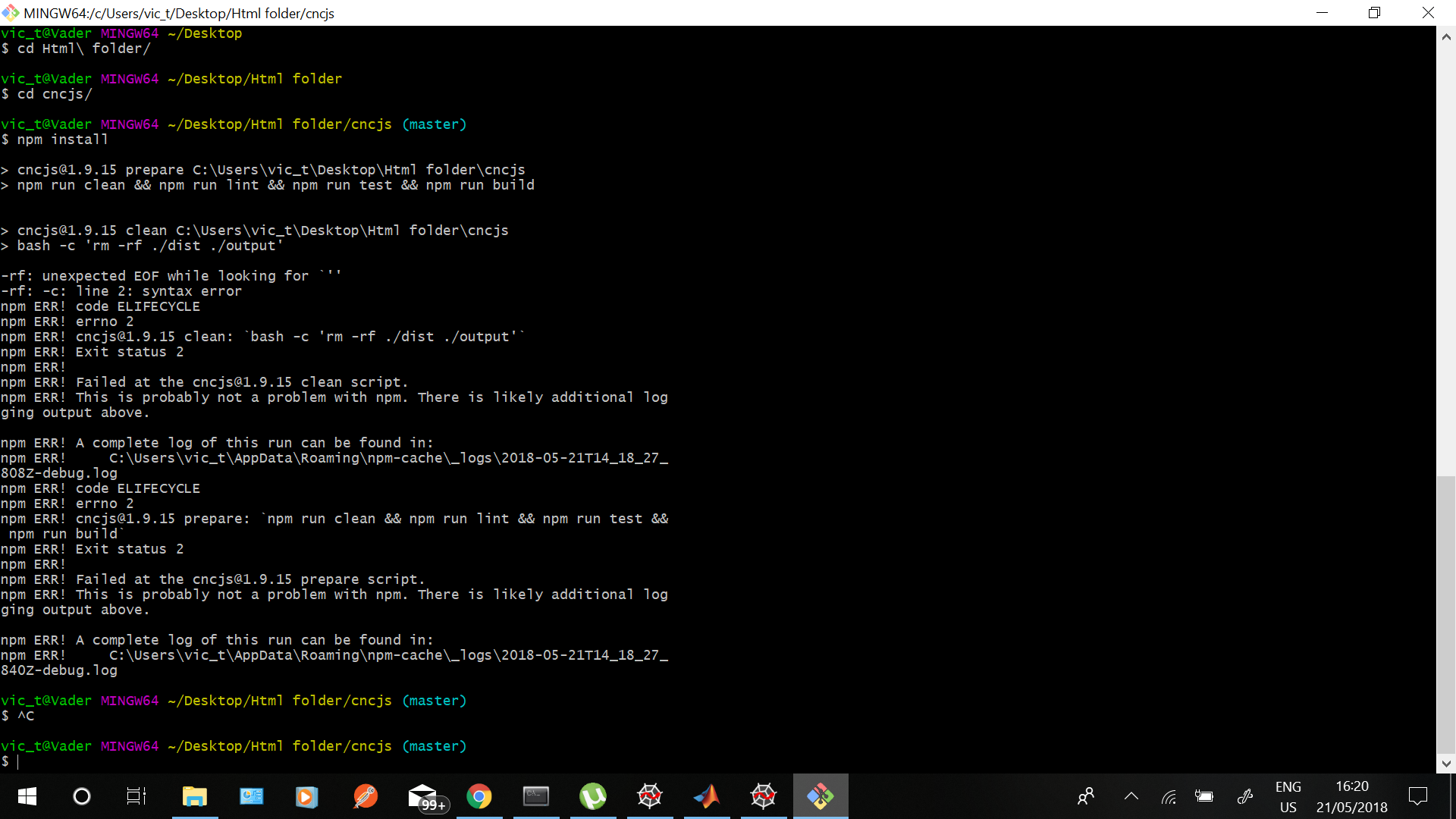
PS C:\Users\vic_t\Desktop\Html folder\cncjs> npm run dev

> cncjs@1.9.15 dev C:\Users\vic_t\Desktop\Html folder\cncjs
> npm run build-dev && npm run start-dev


> cncjs@1.9.15 prebuild-dev C:\Users\vic_t\Desktop\Html folder\cncjs
> bash scripts/prebuild-dev.sh

scripts/prebuild-dev.sh: mkdir: command not found
scripts/prebuild-dev.sh: rm: command not found
scripts/prebuild-dev.sh: sh: No such file or directory
C:/Users/vic_t/Desktop/Html folder/cncjs/src C:/Users/vic_t/Desktop/Html folder/cncjs
scripts/prebuild-dev.sh: cp: command not found
scripts/prebuild-dev.sh: sh: No such file or directory
C:/Users/vic_t/Desktop/Html folder/cncjs

> cncjs@1.9.15 build-dev C:\Users\vic_t\Desktop\Html folder\cncjs
> concurrently --kill-others-on-fail --names "build-dev-app,build-dev-web" "npm run build-dev-app" "npm run build-dev-web"

[build-dev-app]
[build-dev-app] > cncjs@1.9.15 build-dev-app C:\Users\vic_t\Desktop\Html folder\cncjs
[build-dev-app] > webpack --config webpack.appconfig.development.js && npm run build-i18n-app
[build-dev-app]
[build-dev-web]
[build-dev-web] > cncjs@1.9.15 build-dev-web C:\Users\vic_t\Desktop\Html folder\cncjs
[build-dev-web] > npm run build-i18n-web
[build-dev-web]
[build-dev-web]
[build-dev-web] > cncjs@1.9.15 build-i18n-web C:\Users\vic_t\Desktop\Html folder\cncjs
[build-dev-web] > i18next-scanner --config i18next-scanner.webconfig.js "src/web/**/*.{html,js,jsx}" "!src/web/i18n/**" "!**/node_modules/**"
[build-dev-web]
[build-dev-web] [i18next-scanner] transform: count=3, file="components\\Paginations\\index.js"
[build-dev-web] [i18next-scanner] transform: count=13, file="containers\\Header\\Header.jsx"
[build-dev-web] [i18next-scanner] transform: count=12, file="containers\\Header\\QuickAccessToolbar.jsx"
[build-dev-web] [i18next-scanner] transform: count=7, file="containers\\Login\\Login.jsx"
[build-dev-web] [i18next-scanner] transform: count=2, file="containers\\Settings\\About\\AboutContainer.jsx"
[build-dev-web] [i18next-scanner] transform: count=2, file="containers\\Settings\\About\\HelpContainer.jsx"
[build-dev-web] [i18next-scanner] transform: count=5, file="containers\\Settings\\About\\UpdateStatusContainer.jsx"
[build-dev-web] [i18next-scanner] transform: count=8, file="containers\\Settings\\Account\\CreateRecord.jsx"
[build-dev-web] [i18next-scanner] transform: count=17, file="containers\\Settings\\Account\\TableRecords.jsx"
[build-dev-web] [i18next-scanner] transform: count=11, file="containers\\Settings\\Account\\UpdateRecord.jsx"
[build-dev-web] [i18next-scanner] transform: count=7, file="containers\\Settings\\Commands\\CreateRecord.jsx"
[build-dev-web] [i18next-scanner] transform: count=19, file="containers\\Settings\\Commands\\TableRecords.jsx"
[build-dev-web] [i18next-scanner] transform: count=7, file="containers\\Settings\\Commands\\UpdateRecord.jsx"
[build-dev-web] [i18next-scanner] transform: count=5, file="containers\\Settings\\Controller\\Controller.jsx"
[build-dev-web] [i18next-scanner] transform: count=27, file="containers\\Settings\\Events\\CreateRecord.jsx"
[build-dev-web] [i18next-scanner] transform: count=37, file="containers\\Settings\\Events\\TableRecords.jsx"
[build-dev-web] [i18next-scanner] transform: count=27, file="containers\\Settings\\Events\\UpdateRecord.jsx"
[build-dev-web] [i18next-scanner] transform: count=4, file="containers\\Settings\\General\\General.jsx"
[build-dev-web] [i18next-scanner] transform: count=17, file="containers\\Settings\\Settings.jsx"
[build-dev-web] [i18next-scanner] transform: count=5, file="containers\\Settings\\Workspace\\ImportSettings.jsx"
[build-dev-web] [i18next-scanner] transform: count=5, file="containers\\Settings\\Workspace\\RestoreDefaults.jsx"
[build-dev-web] [i18next-scanner] transform: count=8, file="containers\\Settings\\Workspace\\Workspace.jsx"
[build-dev-web] [i18next-scanner] transform: count=2, file="containers\\Sidebar\\Sidebar.jsx"
[build-dev-web] [i18next-scanner] transform: count=3, file="containers\\Workspace\\modals\\FeederPaused.jsx"
[build-dev-web] [i18next-scanner] transform: count=2, file="containers\\Workspace\\modals\\FeederWait.jsx"
[build-dev-web] [i18next-scanner] transform: count=3, file="containers\\Workspace\\modals\\ServerDisconnected.jsx"
[build-dev-web] [i18next-scanner] transform: count=8, file="containers\\Workspace\\PrimaryWidgets.jsx"
[build-dev-web] [i18next-scanner] transform: count=8, file="containers\\Workspace\\SecondaryWidgets.jsx"
[build-dev-web] [i18next-scanner] transform: count=2, file="containers\\Workspace\\WidgetManager\\WidgetListItem.jsx"
[build-dev-web] [i18next-scanner] transform: count=33, file="containers\\Workspace\\WidgetManager\\WidgetManager.jsx"
[build-dev-web] [i18next-scanner] transform: count=15, file="containers\\Workspace\\Workspace.jsx"
[build-dev-web] [i18next-scanner] transform: count=4, file="index.jsx"
[build-dev-web] [i18next-scanner] transform: count=39, file="lib\\gcode-text.js"
[build-dev-web] [i18next-scanner] transform: count=4, file="lib\\validations.jsx"
[build-dev-web] [i18next-scanner] transform: count=155, file="widgets\\Axes\\DisplayPanel.jsx"
[build-dev-web] [i18next-scanner] transform: count=12, file="widgets\\Axes\\index.jsx"
[build-dev-web] [i18next-scanner] transform: count=23, file="widgets\\Axes\\Keypad.jsx"
[build-dev-web] [i18next-scanner] transform: count=12, file="widgets\\Axes\\KeypadOverlay.jsx"
[build-dev-web] [i18next-scanner] transform: count=7, file="widgets\\Axes\\Settings\\General.jsx"
[build-dev-web] [i18next-scanner] transform: count=6, file="widgets\\Axes\\Settings\\index.jsx"
[build-dev-web] [i18next-scanner] transform: count=7, file="widgets\\Axes\\Settings\\MDI\\CreateRecord.jsx"
[build-dev-web] [i18next-scanner] transform: count=14, file="widgets\\Axes\\Settings\\MDI\\TableRecords.jsx"
[build-dev-web] [i18next-scanner] transform: count=7, file="widgets\\Axes\\Settings\\MDI\\UpdateRecord.jsx"
[build-dev-web] [i18next-scanner] transform: count=11, file="widgets\\Axes\\Settings\\ShuttleXpress.jsx"
[build-dev-web] [i18next-scanner] transform: count=11, file="widgets\\Connection\\Connection.jsx"
[build-dev-web] [i18next-scanner] transform: count=8, file="widgets\\Connection\\index.jsx"
[build-dev-web] [i18next-scanner] transform: count=1, file="widgets\\Console\\Console.jsx"
[build-dev-web] [i18next-scanner] transform: count=12, file="widgets\\Console\\index.jsx"
[build-dev-web] [i18next-scanner] transform: count=2, file="widgets\\Custom\\Custom.jsx"
[build-dev-web] [i18next-scanner] transform: count=11, file="widgets\\Custom\\index.jsx"
[build-dev-web] [i18next-scanner] transform: count=5, file="widgets\\Custom\\Settings.jsx"
[build-dev-web] [i18next-scanner] transform: count=12, file="widgets\\GCode\\GCodeStats.jsx"
[build-dev-web] [i18next-scanner] transform: count=8, file="widgets\\GCode\\index.jsx"
[build-dev-web] [i18next-scanner] transform: count=4, file="widgets\\Grbl\\Controller.jsx"
[build-dev-web] [i18next-scanner] transform: count=39, file="widgets\\Grbl\\Grbl.jsx"
[build-dev-web] [i18next-scanner] transform: count=18, file="widgets\\Grbl\\index.jsx"
[build-dev-web] [i18next-scanner] transform: count=8, file="widgets\\Laser\\index.jsx"
[build-dev-web] [i18next-scanner] transform: count=10, file="widgets\\Laser\\Laser.jsx"
[build-dev-web] [i18next-scanner] transform: count=6, file="widgets\\Macro\\AddMacro.jsx"
[build-dev-web] [i18next-scanner] transform: count=11, file="widgets\\Macro\\EditMacro.jsx"
[build-dev-web] [i18next-scanner] transform: count=9, file="widgets\\Macro\\index.jsx"
[build-dev-web] [i18next-scanner] transform: count=7, file="widgets\\Macro\\Macro.jsx"
[build-dev-web] [i18next-scanner] transform: count=3, file="widgets\\Macro\\RunMacro.jsx"
[build-dev-web] [i18next-scanner] transform: count=4, file="widgets\\Marlin\\Controller.jsx"
[build-dev-web] [i18next-scanner] transform: count=10, file="widgets\\Marlin\\index.jsx"
[build-dev-web] [i18next-scanner] transform: count=47, file="widgets\\Marlin\\Marlin.jsx"
[build-dev-web] [i18next-scanner] transform: count=8, file="widgets\\Probe\\index.jsx"
[build-dev-web] [i18next-scanner] transform: count=18, file="widgets\\Probe\\Probe.jsx"
[build-dev-web] [i18next-scanner] transform: count=4, file="widgets\\Probe\\ZProbe.jsx"
[build-dev-web] [i18next-scanner] transform: count=4, file="widgets\\Smoothie\\Controller.jsx"
[build-dev-web] [i18next-scanner] transform: count=13, file="widgets\\Smoothie\\index.jsx"
[build-dev-web] [i18next-scanner] transform: count=32, file="widgets\\Smoothie\\Smoothie.jsx"
[build-dev-web] [i18next-scanner] transform: count=8, file="widgets\\Spindle\\index.jsx"
[build-dev-web] [i18next-scanner] transform: count=10, file="widgets\\Spindle\\Spindle.jsx"
[build-dev-web] [i18next-scanner] transform: count=3, file="widgets\\TinyG\\Controller.jsx"
[build-dev-web] [i18next-scanner] transform: count=16, file="widgets\\TinyG\\index.jsx"
[build-dev-web] [i18next-scanner] transform: count=46, file="widgets\\TinyG\\TinyG.jsx"
[build-dev-web] [i18next-scanner] transform: count=2, file="widgets\\Visualizer\\Dashboard.jsx"
[build-dev-web] [i18next-scanner] transform: count=5, file="widgets\\Visualizer\\index.jsx"
[build-dev-web] [i18next-scanner] transform: count=1, file="widgets\\Visualizer\\Loading.jsx"
[build-dev-web] [i18next-scanner] transform: count=17, file="widgets\\Visualizer\\Notifications.js"
[build-dev-web] [i18next-scanner] transform: count=18, file="widgets\\Visualizer\\PrimaryToolbar.jsx"
[build-dev-web] [i18next-scanner] transform: count=3, file="widgets\\Visualizer\\renderer.jsx"
[build-dev-web] [i18next-scanner] transform: count=1, file="widgets\\Visualizer\\Rendering.jsx"
[build-dev-web] [i18next-scanner] transform: count=10, file="widgets\\Visualizer\\SecondaryToolbar.jsx"
[build-dev-web] [i18next-scanner] transform: count=7, file="widgets\\Visualizer\\WatchDirectory.jsx"
[build-dev-web] [i18next-scanner] transform: count=9, file="widgets\\Visualizer\\WorkflowControl.jsx"
[build-dev-web] [i18next-scanner] transform: count=12, file="widgets\\Webcam\\index.jsx"
[build-dev-web] [i18next-scanner] transform: count=9, file="widgets\\Webcam\\Settings.jsx"
[build-dev-web] [i18next-scanner] transform: count=6, file="widgets\\Webcam\\Webcam.jsx"
[build-dev-web]
[build-dev-web] > cncjs@1.9.15 postbuild-dev-web C:\Users\vic_t\Desktop\Html folder\cncjs
[build-dev-web] > bash -c 'mkdir -p output/web; cp -af src/web/{favicon.ico,i18n,images,textures} output/web/'
[build-dev-web]
[build-dev-web] -p: unexpected EOF while looking for `''
[build-dev-web] -p: -c: line 2: syntax error
[build-dev-web] npm ERR! code ELIFECYCLE
[build-dev-web] npm ERR! errno 2
[build-dev-web] npm ERR! cncjs@1.9.15 postbuild-dev-web: `bash -c 'mkdir -p output/web; cp -af src/web/{favicon.ico,i18n,images,textures} output/web/'`
[build-dev-web] npm ERR! Exit status 2
[build-dev-web] npm ERR!
npm ERR! Failed at the cncjs@1.9.15 postbuild-dev-web script.
[build-dev-web] npm ERR! This is probably not a problem with npm. There is likely additional logging output above.
[build-dev-web]
[build-dev-web] npm ERR! A complete log of this run can be found in:
[build-dev-web] npm ERR!     C:\Users\vic_t\AppData\Roaming\npm-cache\_logs\2018-05-21T09_12_36_589Z-debug.log
[build-dev-web] npm run build-dev-web exited with code 2
--> Sending SIGTERM to other processes..
[build-dev-app] npm run build-dev-app exited with code 1
npm ERR! code ELIFECYCLE
npm ERR! errno 1
npm ERR! cncjs@1.9.15 build-dev: `concurrently --kill-others-on-fail --names "build-dev-app,build-dev-web" "npm run build-dev-app" "npm run build-dev-web"`
npm ERR! Exit status 1
npm ERR!
npm ERR! Failed at the cncjs@1.9.15 build-dev script.
npm ERR! This is probably not a problem with npm. There is likely additional logging output above.

npm ERR! A complete log of this run can be found in:
npm ERR!     C:\Users\vic_t\AppData\Roaming\npm-cache\_logs\2018-05-21T09_12_36_764Z-debug.log
npm ERR! code ELIFECYCLE
npm ERR! errno 1
npm ERR! cncjs@1.9.15 dev: `npm run build-dev && npm run start-dev`
npm ERR! Exit status 1
npm ERR!
npm ERR! Failed at the cncjs@1.9.15 dev script.
npm ERR! This is probably not a problem with npm. There is likely additional logging output above.

npm ERR! A complete log of this run can be found in:
npm ERR!     C:\Users\vic_t\AppData\Roaming\npm-cache\_logs\2018-05-21T09_12_36_788Z-debug.log
无法进入开发模式 #332
合作者
奇顿 评论了 2018 年 5 月 21 日  

我建议您安装“Git for Windows”(https://git-scm.com/download/win)。它提供用于从命令行运行 Git 的 BASH 仿真 (git-bash),并且它支持多个 Linux 命令。这将解决 Windows 环境中的几个问题。

无法进入开发模式 #332
作者
快感 评论了 2018 年 5 月 21 日 通过电子邮件  

无法进入开发模式 #332

@Thrillz 我可以有自动工具更换小部件吗?

无法进入开发模式 #332

@Thrillz 我一直在寻找你很多年

无法进入开发模式 #332
作者
快感 评论了 2018 年 5 月 21 日 通过电子邮件
无法进入开发模式 #332

@Thrillz 我可以有你的 Facebook 或电子邮件吗?我想保持更新,你会免费提供流行吗?

无法进入开发模式 #332
合作者

@Thrillz

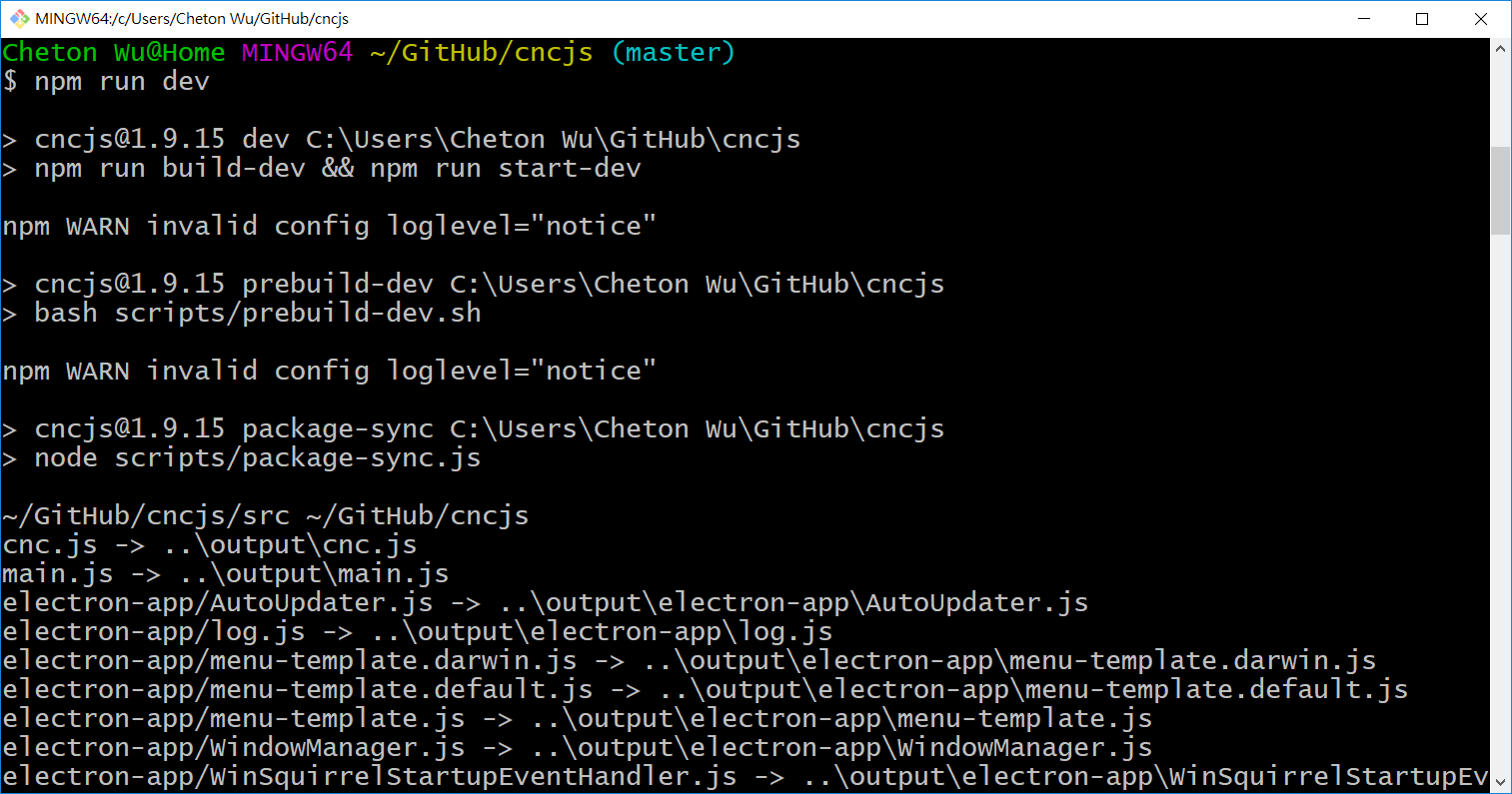
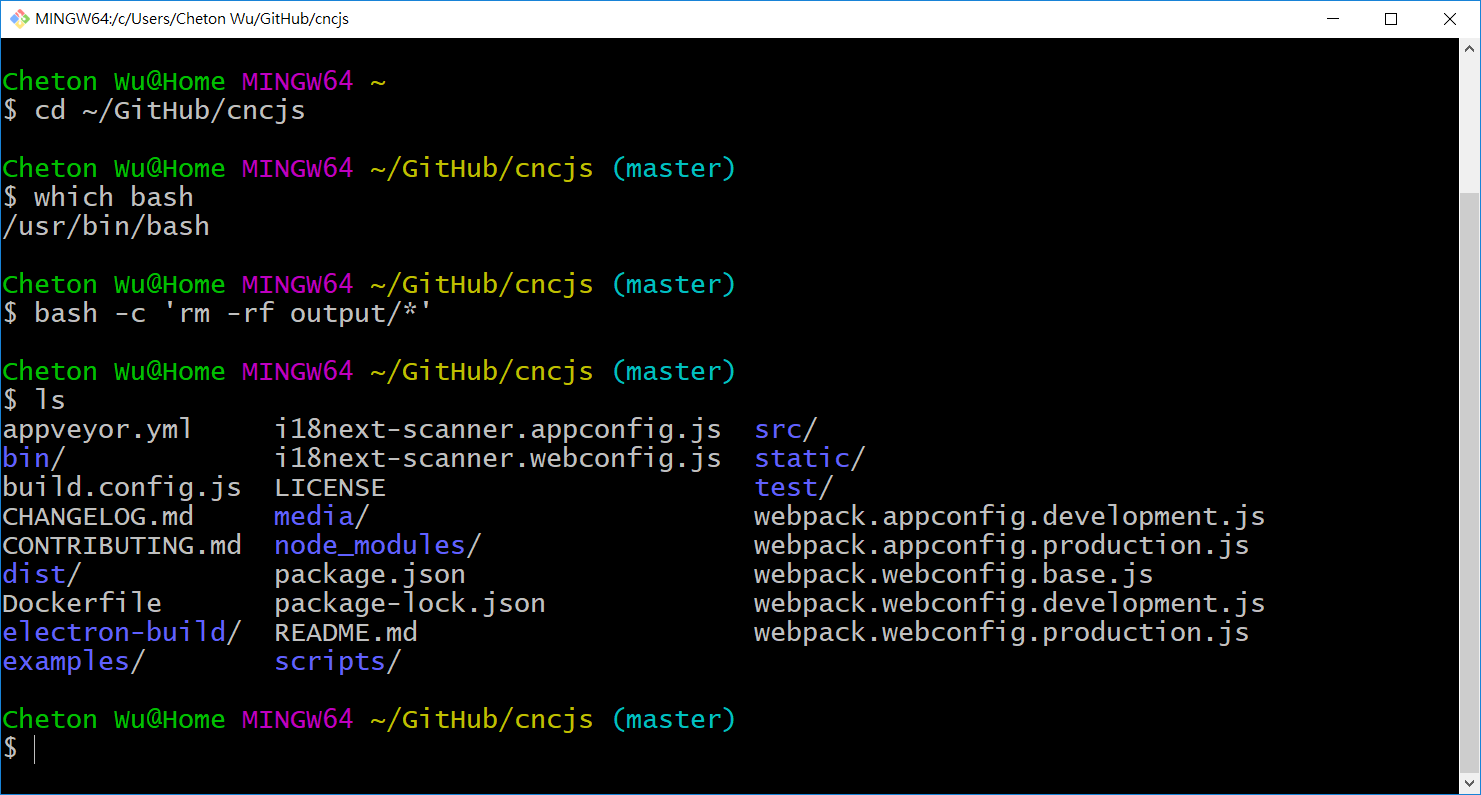
根据附加的日志,您使用的是 Windows PowerShell 命令行,而不是 Git Bash。
Git Bash 终端应如下所示:
无法进入开发模式 #332

无法进入开发模式 #332
作者

@cheton 相同的区别:/
无法进入开发模式 #332

无法进入开发模式 #332
合作者

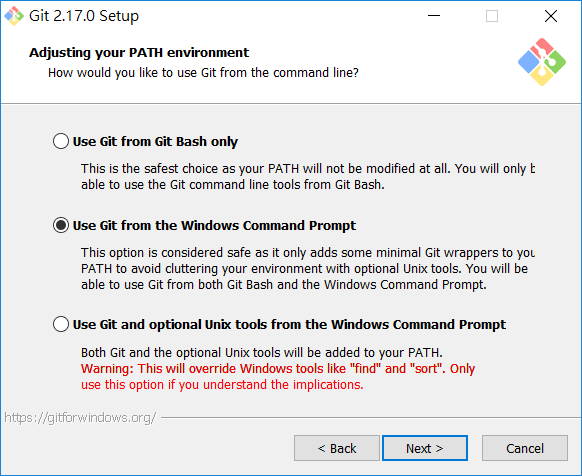
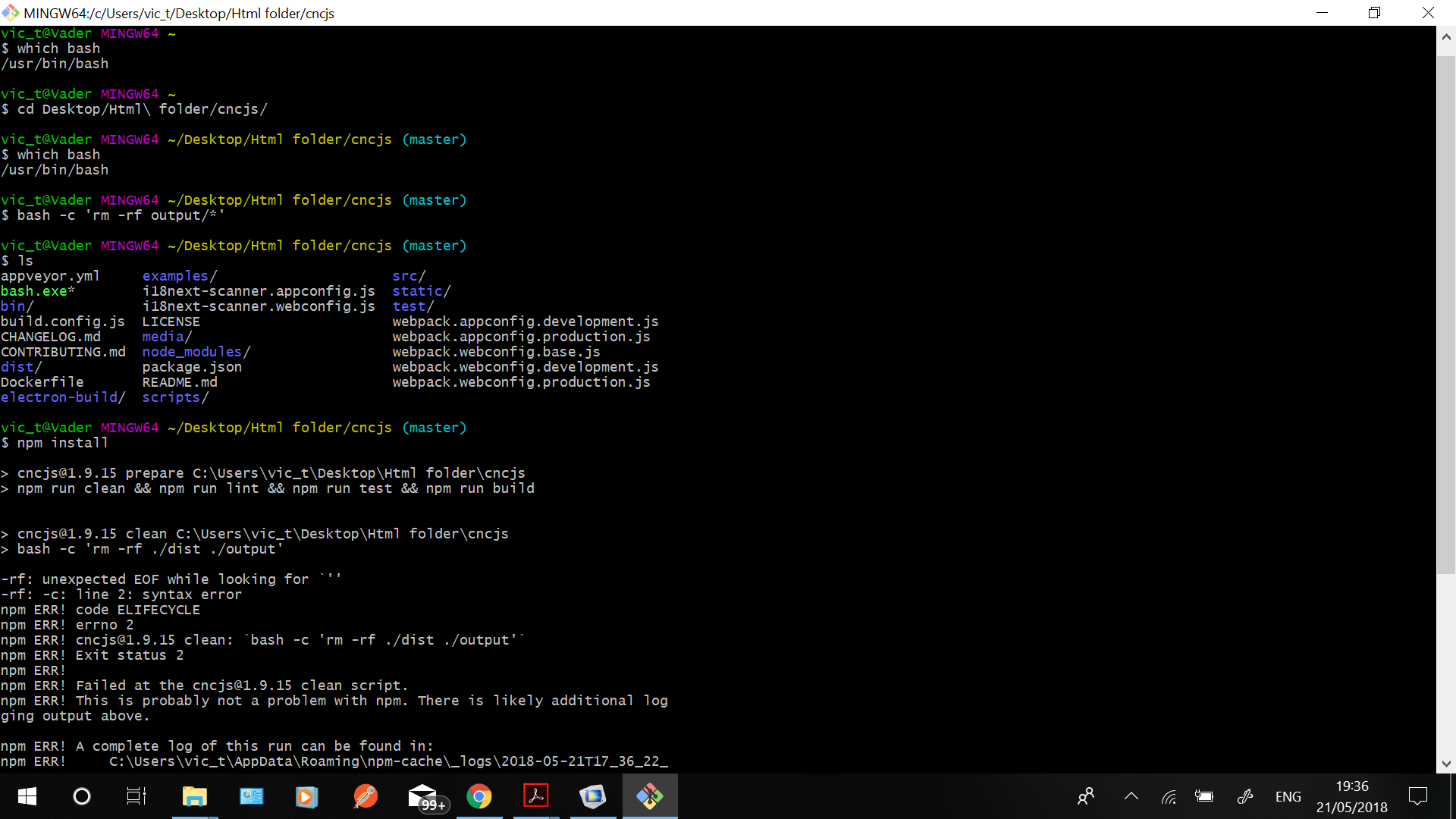
您可能需要再次运行安装,我猜 Unix 工具没有正确安装。

当询问是否安装其他 Unix 实用程序时,请从 Windows 命令提示符中选择使用 Git或从 Windows 命令提示符中选择使用 Git 和可选的 Unix 工具

无法进入开发模式 #332

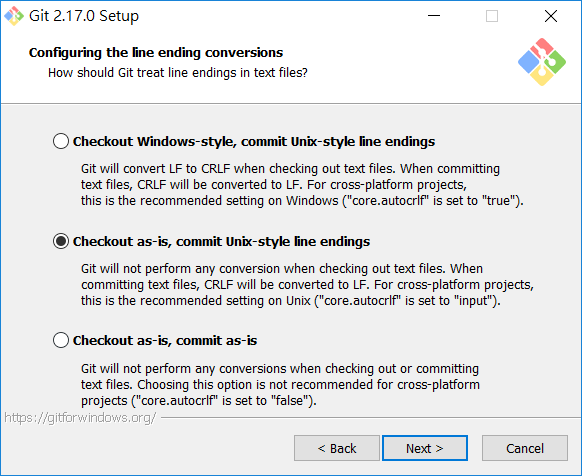
选择Checkout as-is,提交 Unix 风格的行结尾
无法进入开发模式 #332

之后,你可以打开Git Bash,检查是否完全支持 Unix 命令:
无法进入开发模式 #332

无法进入开发模式 #332
作者

@cheton同样的事情又发生了,我不知道为什么我什至强制清理缓存并再次重新安装所有内容。

无法进入开发模式 #332
无法进入开发模式 #332

无法进入开发模式 #332
作者

@nesquik011如果我确实设法设置并正常工作,我会将您链接到分支机构。我相信这是开源的,所以这里不需要钱,我们都在努力完成工作,因为我们关心它。

无法进入开发模式 #332
合作者
奇顿 评论了 2018 年 5 月 22 日  

@Thrillz

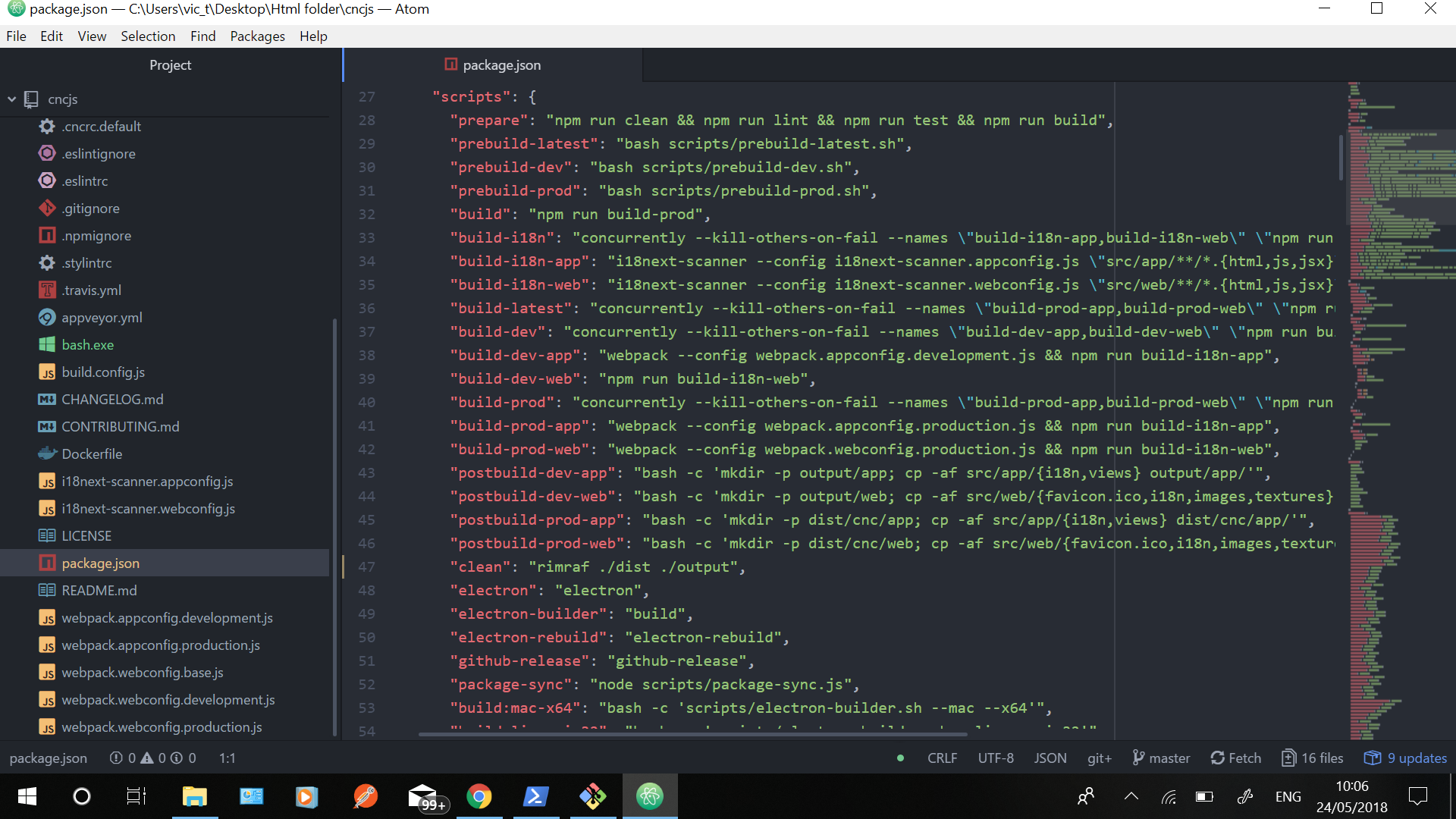
尝试更改package.json 文件中的clean脚本:

"clean": "bash -c 'rm -rf ./dist ./output'",

并将其替换为:

"clean": "rimraf ./dist ./output",

rm -rf这是Node.js的跨平台版本。

无法进入开发模式 #332 奇顿 添加了 问题 标签 2018 年 5 月 23 日
无法进入开发模式 #332
作者

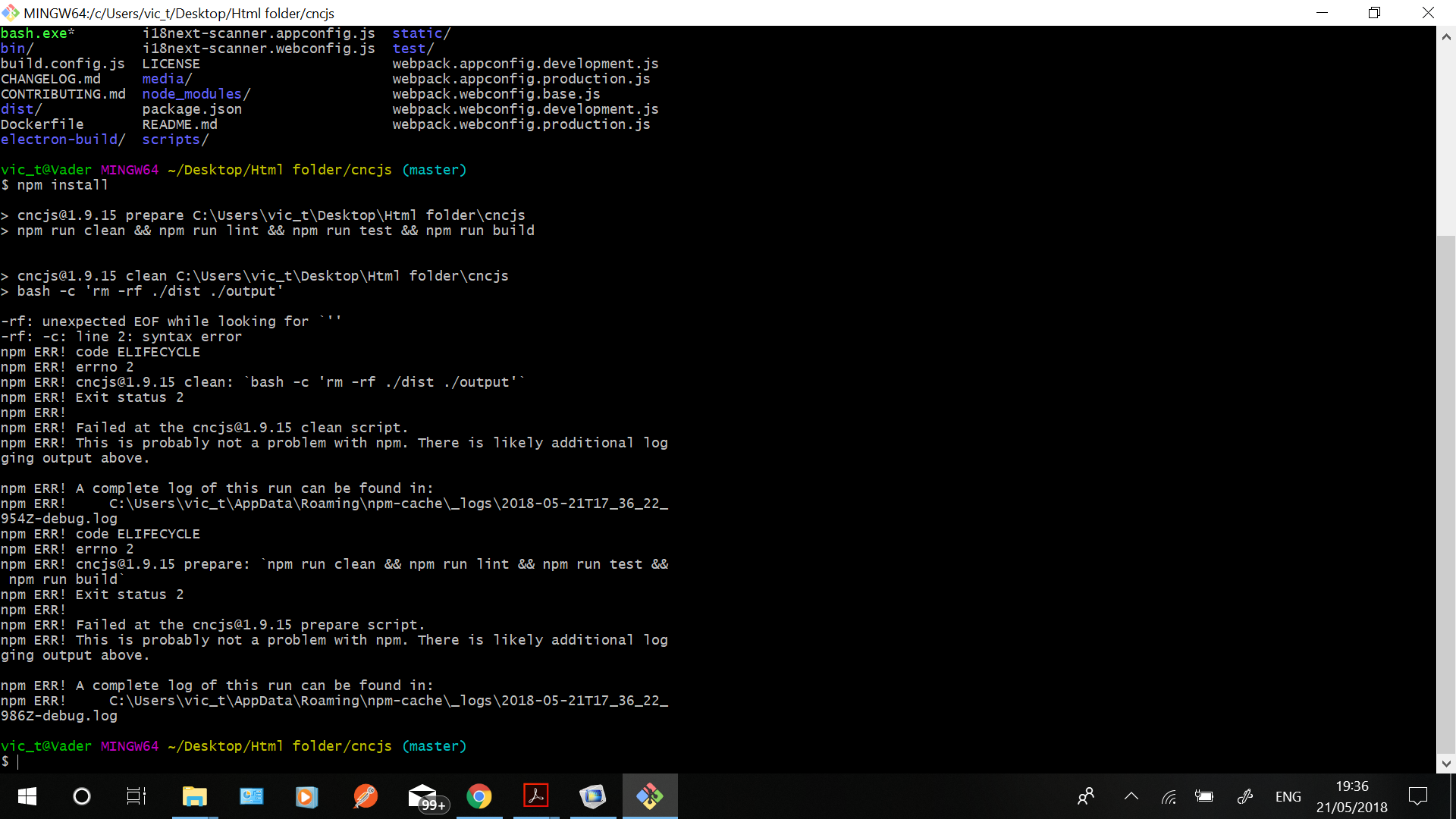
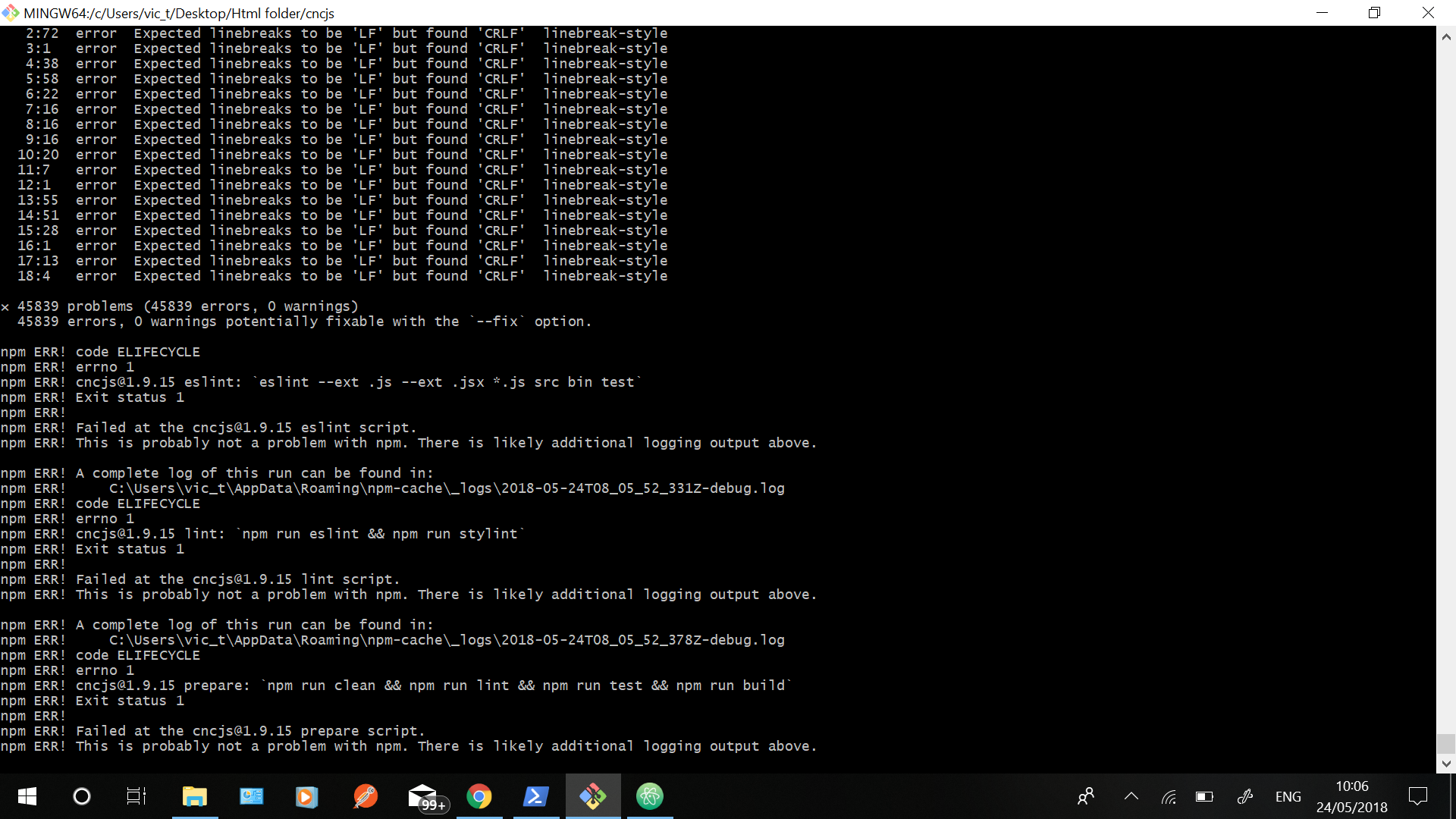
你好@cheton我添加了您建议的更改,但出现了更多错误。

无法进入开发模式 #332

无法进入开发模式 #332

无法进入开发模式 #332
作者

@cheton 如果您确实已经完成了一个 atc 小部件并且可以正常工作,请将其作为 beta 更新推送,以便我们可以使用它,因为我相信很多人想要此功能但无法克服尝试获取小部件时的错误在。我需要你的帮助,我可以寻找程序中的错误,因为这不是用于商业用途。

无法进入开发模式 #332
合作者

@Thrillz

这些错误可能是由于配置行结束转换时的安装设置造成的:

您必须选择Checkout as-is,在安装期间提交 Unix 风格的行尾,然后运行“git clone”再次克隆所有存储库:
无法进入开发模式 #332

无法进入开发模式 #332
作者

你好@cheton我已经按照您的指示重新安装了 git,还清理了缓存,并且 git 再次克隆了所有存储库,我仍然遇到同样的问题,我使用了不同的 Windows 机器,与我的设置相同,但再次遇到相同的错误。我无法运行“npm run prepublish”,我现在收到此错误:


$ npm run prepublish
npm ERR!缺少脚本:预发布

错误!可以在以下位置找到此运行的完整日志:
npm ERR!C:\Users\vic_t\AppData\Roaming\npm-cache_logs\2018-05-24T09_00_38_470Z-debug.log

所以我不知道我还做错了什么。“npm run build-dev”也返回同样的错误.

无法进入开发模式 #332
合作者

很久以前,“预发布”脚本已重命名为“准备”。相反,您必须运行“npm run prepare”来进行生产构建:

https://github.com/cncjs/cncjs/blob/master/package.json#L28

"prepare": "npm run clean && npm run lint && npm run test && npm run build",

要运行本地开发服务器,您只需要在安装 npm 后运行“npm run dev”:
https ://github.com/cncjs/cncjs/blob/master/CONTRIBUTING.md#running-local-development-server

如果您仍然收到 Windows 上报告的行结束错误,请尝试如下修改“.eslintrc”文件以抑制“linebreak-style”错误:

{
    "extends": "trendmicro",
    "parser": "babel-eslint",
    "env": {
        "browser": true,
        "node": true
    },
    "settings": {
        "import/resolver": {
            "webpack": {
                "config": "../webpack.webconfig.base.js"
            }
        }
    },
    "rules": {
        "react/jsx-no-bind": [1, {
            "allowArrowFunctions": true
        }],
        "linebreak-style": 0,
        "react/prefer-stateless-function": 0,
        "react/no-access-state-in-setstate": 0
    }
}
无法进入开发模式 #332
作者

你好@cheton感谢您的帮助,我有自动更换工具的界面。我确实读过一个链接到宏的线程,我希望我的工具更改界面能够运行这些功能,因为目前它只是一个什么都不做的界面。知道我该怎么做。

无法进入开发模式 #332
内斯奎克011 评论了 2018 年 5 月 24 日 通过电子邮件