

评论
.png "手动刀具探测后重启主轴 #1393")
|
我认为它很好:如果选择太高的速度有错误,那么在更改之前已经有工具了。 |
.png "手动刀具探测后重启主轴 #1393")
|
换刀前的速度对应于旧刀具,例如 6mm 直径为 20000。工具更换后,恢复期间再次应用此速度。当然,我的限制没有设置为 12000。我不是在通过单击工具栏来谈论“手动”工具更改。我说的是 gcode 程序中的“手动”工具更改,通过 bcnc 将 M6 cmd 传输到特定序列 |
|
我错过了什么? |
|
M6 不发送到 grbl。M6 被一系列 cmd 取代。最后一个 cmd 恢复存储在 [spindle] 中的主轴状态。这是“S 20000”至少,我是这么认为的。然后,在这个 cmd 之后,“S 12000”被读入并传输到 grbl。M6 命令通过在读取“S 12000”之前恢复主轴状态来完成。在恢复“S 12000”之间有一个延迟,纺丝电极可能会出现。我可以观察现实中的问题,我正在寻找原因。当然,也可能是我的 grbl fork 中的问题。但目前我会说,问题出在bCNC。我将在下周末进行测试。 |
.jpg "手动刀具探测后重启主轴 #1393")
|
@gauna85 只是为了澄清,你希望它遵守 gcode 文件中的内容并且没有问题: lines.append("f[feed] [spindle]") # ... feed and spindle
这对我来说是有道理的,因为您正在使用一个可能有自己的最大值的文件手动执行此操作。应该兑现的主轴值。 你用什么 无论如何,作为一个例子,我认为类似下面的内容适合您的用例,但可能可以在工具更改部分使用复选框(使用文件中的进给/主轴)以使其可选(不知道其他用户如何期待这个工作): #----------------------------------------------------------------------
# code to change manually tool
#----------------------------------------------------------------------
def toolChange(self, tool=None):
if tool is not None:
# Force a change
self.tool = tool
self._lastTool = None
# check if it is the same tool
if self.tool is None or self.tool == self._lastTool: return []
# create the necessary code
lines = []
lines.append("$g") # remember state and populate variables, FIXME: move to ./controllers/_GenericController.py
lines.append("m5") # stop spindle
lines.append("%wait")
lines.append("%_x,_y,_z = wx,wy,wz") # remember position
lines.append("g53 g0 z[toolchangez]")
lines.append("g53 g0 x[toolchangex] y[toolchangey]")
lines.append("%wait")
if CNC.comment: # XXX: Why %% are used here, but nowhere else?
lines.append("%%msg Tool change T%02d (%s)"%(self.tool,CNC.comment))
else:
lines.append("%%msg Tool change T%02d"%(self.tool))
lines.append("m0") # feed hold
if CNC.toolPolicy < 4:
lines.append("g53 g0 x[toolprobex] y[toolprobey]")
lines.append("g53 g0 z[toolprobez]")
# fixed WCS
if CNC.vars["fastprbfeed"]:
prb_reverse = {"2": "4", "3": "5", "4": "2", "5": "3"}
CNC.vars["prbcmdreverse"] = (CNC.vars["prbcmd"][:-1] +
prb_reverse[CNC.vars["prbcmd"][-1]])
currentFeedrate = CNC.vars["fastprbfeed"]
while currentFeedrate > CNC.vars["prbfeed"]:
lines.append("%wait")
lines.append("g91 [prbcmd] %s z[toolprobez-mz-tooldistance]"%(
CNC.fmt('f',currentFeedrate)))
lines.append("%wait")
lines.append("[prbcmdreverse] %s z[toolprobez-mz]"%(
CNC.fmt('f',currentFeedrate)))
currentFeedrate /= 10
lines.append("%wait")
lines.append("g91 [prbcmd] f[prbfeed] z[toolprobez-mz-tooldistance]")
if CNC.toolPolicy==2: # manual tool change (WCS)
# Adjust the current WCS to fit to the tool
# FIXME could be done dynamically in the code
p = WCS.index(CNC.vars["WCS"])+1
lines.append("g10l20p%d z[toolheight]"%(p))
lines.append("%wait")
elif CNC.toolPolicy==3: # manual tool change (TLO)
# Modify the tool length, update the TLO
lines.append("g4 p1") # wait a sec to get the probe info
lines.append("%wait")
lines.append("%global TLO; TLO=prbz-toolmz")
lines.append("g43.1z[TLO]")
lines.append("%update TLO")
lines.append("g53 g0 z[toolchangez]")
lines.append("g53 g0 x[toolchangex] y[toolchangey]")
if CNC.toolWaitAfterProbe:
lines.append("%wait")
lines.append("%msg Restart spindle")
lines.append("m0") # feed hold
# restore state
lines.append("g90") # restore mode
lines.append("g0 x[_x] y[_y]") # ... x,y position
lines.append("g0 z[_z]") # ... z position
# lines.append("f[feed] [spindle]") # ... feed and spindle
# lines.append("g4 p5") # wait 5s for spindle to speed up
# do not append feed/spindle for these policies # XXX: Issue #1393
		if not CNC.toolPolicy==3:
			lines.append("f[feed] [spindle]") # ... feed and spindle
			lines.append("g4 p5")             # wait 5s for spindle to speed up
# remember present tool
self._lastTool = self.tool
print("<<< toolChange:\n",lines)
return lines
同样,可能有更好的选择,但是之前的代码不管政策如何附加它,在我看来,这应该基于函数的政策/用户使用。 |
|
是的,我想跳过这一行。仅供参考,“[spindel]”是我的 gcode 文件中的最后一个值,甚至是 GUI 中的值?但无论如何,运行 gcode 文件不应该在 M6 结束时重新启动主轴。这通常在下一行完成。但这不应该在一种参考中定义吗?M6在做什么? 我正在使用 TLO。 |
|
我相信它只是使用您更新到控制器的 bCNC 配置中的最大主轴值: 如果您有一些要测试的代码,我可以验证以确保您获得所需的结果。 至于重新启动,您的文件是否已经 if not CNC.toolPolicy==3:
lines.append("f[feed] [spindle]") # ... feed and spindle
lines.append("g4 p5") # wait 5s for spindle to speed up
如果你不需要它。 |
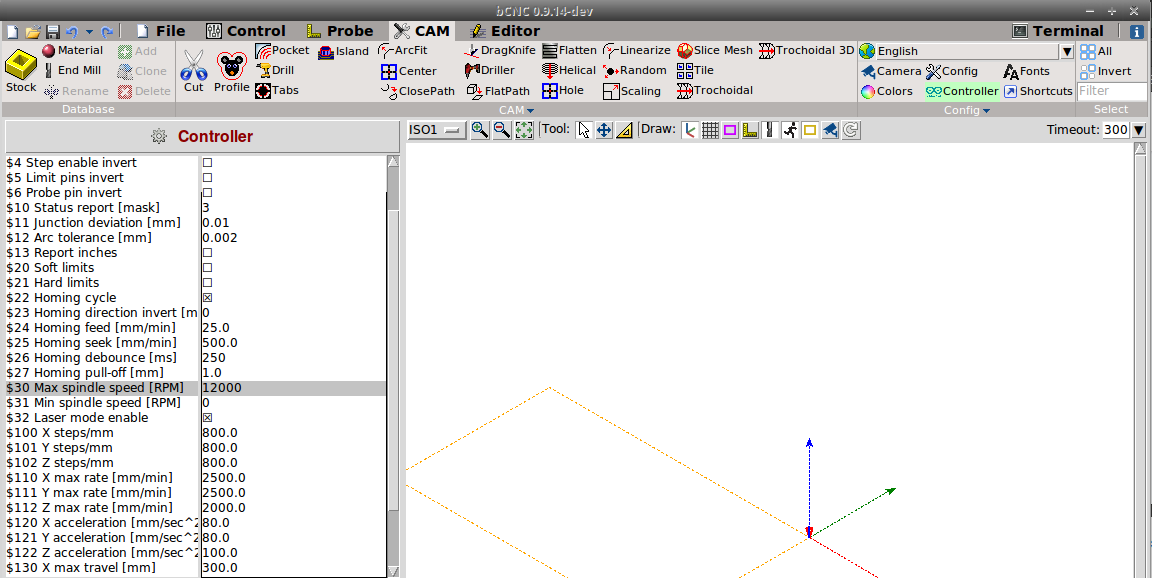
|
但是,如果您在从 GUI 运行期间使用它,它可能会存储以前使用过的工具的最后一个主轴速率,甚至可能是覆盖。
不确定您所说的参考,代码是 我添加了一条 |
|
我使用“–wait-for-spindle 2 –tool-change”在 FreeCAD 帖子中生成我的 gcode。我的代码包括 G4 cmd 是的,grbl 忽略了 M6。这就是 bcnc 插入序列的原因。我虽然关于和“官方”gcode 参考,其中描述了 M6 的功能操作,例如,如果 M6 实现应该回到工具更换之前的最后一个操作位置,或者如果后处理器必须确保回到最后一个如果需要的位置。只是我的想法。我不确定是否有任何标准。 我附上了一个由 Freecad 使用 2 种不同的工具和主轴速度生成的简单测试文件。 谢谢你的努力。 |
|
@gauna85对于迟到的回复我深表歉意…
这是一个示例,用于显示当您运行 M6(没有实际使用它)时发生的情况,您可以在编辑器中查看。 (Block-name: Header)
(Block-expand: 1)
(Block-enable: 1)
(Exported by FreeCAD)
(Post Processor: grbl_post)
(Output Time:2020-04-28 20:12:41.319659)
(Begin preamble)
G17 G90
G21
(Block-name: Fixture)
(Block-expand: 1)
(Block-enable: 1)
(Begin operation: Fixture)
(Path: Fixture)
G54
(Finish operation: Fixture)
(Block-name: T2: Endfraeser 4mm)
(Block-expand: 1)
(Block-enable: 0)
(Block-X: [Begin operation: T2: Endfraeser 4mm])
(Block-X: [Path: T2: Endfraeser 4mm])
(Block-X: [T2: Endfraeser 4mm])
(Block-X: [Begin toolchange])
(Block-X: M3 S0)
(Block-X: M6 T2)
(Block-X: M3 S24000)
(Block-X: G4 P2)
(Block-X: [Finish operation: T2: Endfraeser 4mm])
(Block-name: T2: Endfraeser 4mm)
(Block-expand: 1)
(Block-enable: 1)
(Begin operation: T2: Endfraeser 4mm)
(Path: T2: Endfraeser 4mm)
(T2: Endfraeser 4mm)
(Begin toolchange)
(set initial feedrate value?)
F600
(set initial spindle RPM to zero or expected value)
M3 S0
(This is what M6 is doing!)
(Note: there is a check for tool here that I am not handling!)
(remember state and populate variables)
$G
(stop spindle)
M5
%wait
(remember position)
%_x,_y,_z = wx,wy,wz
g53 g0 z[toolchangez]
g53 g0 x[toolchangex] y[toolchangey]
%wait
%msg Tool change T2 (4mm)
(feed hold)
m0
(if toolPolicy < 4)
g53 g0 x[toolprobex] y[toolprobey]
g53 g0 z[toolprobez]
(there is a while loop here... I am just using fastprbfeed, but can use a variable set here)
%wait
g91 [prbcmd] f[fastprbfeed] z[toolprobez-mz-tooldistance]
%wait
[prbcmdreverse] f[fastprbfeed] z[toolprobez-mz]
%wait
g91 [prbcmd] f[prbfeed] z[toolprobez-mz-tooldistance]
(end of while loop)
(wait a second to get the probe info)
g4 p1
%wait
%global TLO; TLO=prbz-toolmz
g43.1z[TLO]
%update TLO
g53 g0 z[toolchangez]
g53 g0 x[toolchangex] y[toolchangey]
%wait
%msg Restart spindle
(feed hold)
m0
g90
g0 x[_x] y[_y]
g0 z[_z]
(here, spindle represents M[mode])
(f[feed] [spindle]) ; commented out
(g4 p5) ; commented out and put into the next block
(Note: _lastTool is set here; I am not handling it though!)
%msg Finish operation
(Finish operation: T2: Endfraeser 4mm)
(Block-name: MillFace)
(Block-expand: 1)
(Block-enable: 1)
(Begin operation: MillFace)
(Path: MillFace)
(MillFace)
M3 S24000 (start spindle)
g4 p5 (wait 5 seconds for spindle)
G0 Z60.000
G1 X8.000 Y2.000 Z10.000 F600.000
G1 X8.000 Y4.829 Z10.000 F1800.000
G1 X5.171 Y2.000 Z10.000 F1800.000
G1 X2.343 Y2.000 Z10.000 F1800.000
G1 X8.000 Y7.657 Z10.000 F1800.000
G1 X8.000 Y8.000 Z10.000 F1800.000
G1 X5.514 Y8.000 Z10.000 F1800.000
G1 X2.000 Y4.486 Z10.000 F1800.000
G1 X2.000 Y7.314 Z10.000 F1800.000
G1 X2.686 Y8.000 Z10.000 F1800.000
G1 X2.000 Y8.000 Z10.000 F1800.000
G1 X2.000 Y7.314 Z10.000 F1800.000
G0 Z60.000
G0 Z60.000
(Finish operation: MillFace)
(Block-name: T3: Endfraeser 6mm)
(Block-expand: 1)
(Block-enable: 1)
(Begin operation: T3: Endfraeser 6mm)
(Path: T3: Endfraeser 6mm)
(T3: Endfraeser 6mm)
(Begin toolchange)
M3 S0
M6 T3
M3 S19099
G4 P2
(Finish operation: T3: Endfraeser 6mm)
(Block-name: MillFace001)
(Block-expand: 0)
(Block-enable: 1)
(Begin operation: MillFace001)
(Path: MillFace001)
(MillFace001)
G0 Z60.000
G1 X6.757 Y7.000 Z10.000 F600.000
G1 X3.000 Y3.243 Z10.000 F1800.000
G1 X3.000 Y7.000 Z10.000 F1800.000
G1 X6.757 Y7.000 Z10.000 F1800.000
G1 X7.000 Y7.000 Z10.000 F1800.000
G1 X7.000 Y3.000 Z10.000 F1800.000
G0 Z60.000
G0 Z60.000
(Finish operation: MillFace001)
(Block-name: post_amble)
(Block-expand: 0)
(Block-enable: 1)
(Begin postamble)
M5
G17 G90
M2
另外,另一个例子是 def calibrate(self, event=None):
self.set()
if self.check4Errors(): return
lines = []
lines.append("g53 g0 z[toolchangez]")
lines.append("g53 g0 x[toolchangex] y[toolchangey]")
lines.append("g53 g0 x[toolprobex] y[toolprobey]")
lines.append("g53 g0 z[toolprobez]")
if CNC.vars["fastprbfeed"]:
prb_reverse = {"2": "4", "3": "5", "4": "2", "5": "3"}
CNC.vars["prbcmdreverse"] = (CNC.vars["prbcmd"][:-1] +
prb_reverse[CNC.vars["prbcmd"][-1]])
currentFeedrate = CNC.vars["fastprbfeed"]
while currentFeedrate > CNC.vars["prbfeed"]:
lines.append("%wait")
lines.append("g91 [prbcmd] %s z[toolprobez-mz-tooldistance]" \
% CNC.fmt('f',currentFeedrate))
lines.append("%wait")
lines.append("[prbcmdreverse] %s z[toolprobez-mz]" \
% CNC.fmt('f',currentFeedrate))
currentFeedrate /= 10
lines.append("%wait")
lines.append("g91 [prbcmd] f[prbfeed] z[toolprobez-mz-tooldistance]")
lines.append("g4 p1") # wait a sec
lines.append("%wait")
lines.append("%global toolheight; toolheight=wz")
lines.append("%global toolmz; toolmz=prbz")
lines.append("%update toolheight")
lines.append("g53 g0 z[toolchangez]")
lines.append("g53 g0 x[toolchangex] y[toolchangey]")
lines.append("g90")
self.app.run(lines=lines)
我提到上面是因为我记得有人发布了关于使用控制器或键盘(我必须找到它)和使用校准方法(我相信这就是他们所需要的,在他们通过自己的宏进行初始工具更改之后)进行工具更改的帖子) 来完成他们的任务。 我相信一个问题(脱离示例)是没有地方可以输入主轴速度,并且可能完全依赖于控制器的值(如果是这种情况)。从我所看到的(以及 bCNC 如何使用 $G)来看,在换刀之前设置主轴值可能会有所帮助,即使您只是将其设置为零或您希望它在更改后的值。但是,像你一样,我看不到提要或暂停的意义在于代码中的原样,当然最好在 gcode 文件中定义。 无论如何,您当然不限于使用内置方法,有上千种方法可以使皮肤…bCNC 只是评估 gcode 并使用一些内置方法处理它,但是您可以使用自己的代码,所以只要您正确编码以满足其评估。 伙计,我希望这是有道理的,我不太擅长用书面形式解释事情! |




对于手动换刀,附加以下代码:
在换刀后恢复上一个主轴状态,如果新工具的最大允许转速低于上一个工具的最大速度,这是非常危险的。