

评论
.png "网状挂件,画面闪烁 #1509")
|
@Guenni75您是否首先直接从 bCNC 尝试过? 确保您已连接到 pendant,并且可以通过 bCNC 通过 pendant 在本地运行一些代码。 就个人而言,由于摄像头、网络等问题,我很久以前就停止使用 Lubuntu。我发现 Linux Mint XFCE 版本更符合要求,我在我的旧机器上使用 32 位版本,当然还有 64 位版本-位较新。我远离 Cinnamon 和 Mate,因为我自己更喜欢轻量级操作系统。 |
|
@Guenni75在我这边做了一些进一步的调查,当打开一个挂件文件时确实有问题。它在 Python2 中工作,但是它需要为 Python3 打补丁。 一旦我有补丁,我会尽快回复。 |
|
@Guenni75 @Harvie以及任何其他想要在提交之前测试以下内容的人。 在 python 2.7.14(已经在那里工作)和 3.8.2(那里有很多问题)
# -*- coding: ascii -*-
# $Id$
#
# Author: Vasilis Vlachoudis
# Email:  vvlachoudis@gmail.com
# Date:   24-Aug-2014

from __future__ import absolute_import
from __future__ import print_function
__author__ = "Vasilis Vlachoudis"
__email__  = "Vasilis.Vlachoudis@cern.ch"

import os
import re
import sys
#import cgi
import json
#import urllib
import tempfile
import threading

# ---------------------------------------
# For debugging issues
# ---------------------------------------
import traceback
from errno import EPIPE
try:
	broken_pipe_error = BrokenPipeError  # Python3 has: BrokenPipeError
except NameError:
	broken_pipe_error = IOError
# ---------------------------------------

try:
	import urllib.parse as urlparse
	from urllib.parse import unquote
except ImportError:
	import urlparse
	from urllib import unquote as unquote

try:
	import http.server as HTTPServer
except ImportError:
	import BaseHTTPServer as HTTPServer

try:
	from PIL import Image
except ImportError:
	Image = None

from CNC import CNC
from Utils import prgpath
import Camera

HOSTNAME = "localhost"
port     = 8080

httpd    = None
webpath  = "%s/pendant"%(prgpath)
iconpath = "%s/icons/"%(prgpath)


#==============================================================================
# Simple Pendant controller for CNC
#==============================================================================
class Pendant(HTTPServer.BaseHTTPRequestHandler):
	camera = None

	#----------------------------------------------------------------------
	def log_message(self, fmt, *args):
		# Only log requests to the main page, ignore the rest
		if args[0].startswith("GET / ") or args[0].startswith("GET /send"):
			args = list(args)
			args[0] = "%s : %s"%(self.address_string(),args[0])
			HTTPServer.BaseHTTPRequestHandler.log_message(self, fmt, *args)

	#----------------------------------------------------------------------
	def do_HEAD(self, rc=200, content="text/html", cl=0):
		self.send_response(rc)
		self.send_header("Content-type", content)
		if cl != 0:
			self.send_header("Content-length", cl)
		self.end_headers()

	#----------------------------------------------------------------------
	def do_GET(self):
		"""Respond to a GET request."""
		if "?" in self.path:
			page,arg = self.path.split("?",1)
			arg = dict(urlparse.parse_qsl(arg))
		else:
			page = self.path
			arg = None

#		print(self.path,type(self.path))
#		print(page)
#		print(arg)

		if   page == "/send":
			if arg is None: return
			for (key,value) in arg.items():
				if key=="gcode":
					for line in value.split('\n'):
						httpd.app.queue.put('%s\n'%(line))
				elif key=="cmd":
					httpd.app.pendant.put(unquote(value))
			# Send empty response so browser does not generate errors
			self.do_HEAD(200, "text/text", cl=len(""))
			self.wfile.write("".encode())

		elif page == "/state":
			tmp = {}
			for name in ["controller", "state", "pins", "color", "msg", "wx", "wy", "wz", "G", "OvFeed", "OvRapid", "OvSpindle"]:
				tmp[name] = CNC.vars[name]
			contentToSend = json.dumps(tmp)
			self.do_HEAD(200, content="text/text", cl=len(contentToSend))
			self.wfile.write(contentToSend.encode())

		elif page == "/config":
			snd = {}
			snd["rpmmax"] = httpd.app.get("CNC","spindlemax")
			contentToSend = json.dumps(snd)
			self.do_HEAD(200, content="text/text", cl=len(contentToSend))
			self.wfile.write(contentToSend.encode())

		elif page == "/icon":
			if arg is None: return
			filename = os.path.join(iconpath, arg["name"]+".gif")
			self.do_HEAD(200, content="image/gif", cl=os.path.getsize(filename))
			try:
				f = open(filename,"rb")
				self.wfile.write(f.read())
				f.close()
			except:
				pass

		elif page == "/canvas":
			if not Image: return
			with tempfile.NamedTemporaryFile(suffix='.ps') as tmp:
				httpd.app.canvas.postscript(
					file=tmp.name,
					colormode='color',
				)
				tmp.flush()
				try:
					with tempfile.NamedTemporaryFile(suffix='.gif') as out:
						Image.open(tmp.name).save(out.name, 'GIF')
						out.flush()
						out.seek(0)
						self.do_HEAD(200, content="image/gif", cl=os.path.getsize(tmp.name))

#						self.wfile.write(out.read())
						try:
							self.wfile.write(out.read())
						except broken_pipe_error as exc: # [Errno 32] Broken pipe
							if broken_pipe_error == IOError:
								if exc.errno != EPIPE:
									raise
#							print('do_GET:\n  %s: %s [Errno %s] [EPIPE %s]'%(
#									broken_pipe_error, exc, exc.errno, EPIPE))
#							print(traceback.format_exc())

				except:
					filename = os.path.join(iconpath, "warn.gif")
					self.do_HEAD(200, content="image/gif", cl=os.path.getsize(filename))
					try:
						f = open(filename,"rb")
						self.wfile.write(f.read())
						f.close()
					except:
						pass

		elif page == "/camera":
			if not Camera.hasOpenCV(): return
			if Pendant.camera is None:
				Pendant.camera = Camera.Camera("webcam")
				Pendant.camera.start()

			if Pendant.camera.read():
				Pendant.camera.save("camera.jpg")
				#cv.imwrite("camera.jpg",img)
				self.do_HEAD(200, content="image/jpeg", cl=os.path.getsize("camera.jpg"))
				try:
					f = open("camera.jpg","rb")
					self.wfile.write(f.read())
					f.close()
				except:
					pass
		else:
			self.mainPage(page[1:])

	#----------------------------------------------------------------------
	def deal_post_data(self):
		boundary = None  # FIX: UnboundLocalError: local variable 'boundary' referenced before assignment

		#boundary = self.headers.plisttext.split("=")[1]  # AttributeError: 'HTTPMessage' object has no attribute 'plisttext'
		try:
			boundary = self.headers.plisttext.split("=")[1]  # plisttext is from mimetools and has been deprecated in favor of email, but whatever!
		except Exception as exc:
			#print('deal_post_data:\n  Exception: %s'%(exc))
			boundary = self.headers.get_boundary()           # HTTPMessage has this, though

		if boundary is None:
			return (False, "boundary is None")

		remainbytes = int(self.headers['content-length'])
		#line = self.rfile.readline()
		line = self.rfile.readline().decode()
		remainbytes -= len(line)

		if not boundary in line:
			return (False, "Content NOT begin with boundary")

		#line = self.rfile.readline()
		line = self.rfile.readline().decode()
		remainbytes -= len(line)
		fn = re.findall(r'Content-Disposition.*name="file"; filename="(.*)"', line)
		if not fn:
			return (False, "Can't find out file name...")
		path = os.path.expanduser("~")
		path = os.path.join(path, "bCNCUploads")
		if not os.path.exists(path):
		    os.makedirs(path)
		fn = os.path.join(path, fn[0])
		#line = self.rfile.readline()
		line = self.rfile.readline().decode()
		remainbytes -= len(line)
		#line = self.rfile.readline()
		line = self.rfile.readline().decode()
		remainbytes -= len(line)
		try:
			out = open(fn, 'wb')
#		except IOError:
		except Exception as exc:
			print('deal_post_data:\n  Exception: %s'%(exc))
			return (False, "Can't create file to write, do you have permission to write?")

		#preline = self.rfile.readline()
		preline = self.rfile.readline().decode()
		remainbytes -= len(preline)
		while remainbytes > 0:
			#line = self.rfile.readline()
			line = self.rfile.readline().decode()
			remainbytes -= len(line)
			if boundary in line:
				preline = preline[0:-1]
				if preline.endswith('\r'):
					preline = preline[0:-1]
				#out.write(preline)
				if isinstance(preline, bytes):
					out.write(preline)
				else:
					out.write(preline.encode())

				out.close()
				return (True, "%s" % fn)
			else:
				#out.write(preline)
				if isinstance(preline, bytes):
					out.write(preline)
				else:
					out.write(preline.encode())

				preline = line
		return (False, "Unexpected End of data.")

	#----------------------------------------------------------------------
	def do_POST(self):
		result,fMsg = self.deal_post_data()
		if(result):
			httpd.app._pendantFileUploaded = fMsg
		# Send empty response so browser does not generate errors
		#self.do_HEAD(200, "text/text")
		try:
			self.do_HEAD(200, "text/text")
		except Exception as exc:
			print('do_POST:\n  Exception: %s'%(exc))

	# ---------------------------------------------------------------------
	def mainPage(self, page):
		global webpath

		# Handle certain filetypes
		filetype = page.rpartition('.')[2]
		if   filetype == "css": self.do_HEAD(content="text/css")
		elif filetype == "js":  self.do_HEAD(content="application/x-javascript")
		elif filetype == "json": self.do_HEAD(content="application/json")
		elif filetype == "jpg" or filetype == "jpeg" : self.do_HEAD(content="image/jpeg")
		elif filetype == "gif": self.do_HEAD(content="image/gif")
		elif filetype == "png": self.do_HEAD(content="image/png")
		elif filetype == "ico": self.do_HEAD(content="image/x-icon")
		else: self.do_HEAD()

		if page == "": page = "index.html"
		try:
			f = open(os.path.join(webpath,page),"rb")
			self.wfile.write(f.read())
			f.close()
#		except IOError:  # XXX: This was blocking: FileNotFoundError
		except Exception as exc:
#FileNotFoundError: [Errno 2] No such file or directory: '/bCNC/pendant/favicon.ico'
			print('mainPage:\n  Exception: %s'%(exc))

			self.wfile.write("""<!DOCTYPE html>
<html>
<head>
<title>Errortitle</title>
<meta name="viewport" content="width=device-width,initial-scale=1, user-scalable=yes" />
</head>
<body>
Page not found.
</body>
</html>
""".encode())


# -----------------------------------------------------------------------------
def _server(app):
	global httpd
	server_class = HTTPServer.HTTPServer
	try:
		httpd = server_class(('', port), Pendant)
		httpd.app = app
		httpd.serve_forever()
	except:
		httpd = None


# -----------------------------------------------------------------------------
def start(app):
	global httpd

	if httpd is not None: return False
	thread = threading.Thread(target=_server, args=(app,))
	thread.start()
	return True


# -----------------------------------------------------------------------------
def stop():
	global httpd
	if httpd is None: return False
	httpd.shutdown()
	httpd = None
	if Pendant.camera: Pendant.camera.stop()
	return True

if __name__ == '__main__':
	start()
|
.png "网状挂件,画面闪烁 #1509")
|
你好。更新到 Ubuntu 20 之后…,我在没有上面的 pendant.py 的情况下再次尝试。 处理来自 (‘127.0.0.1’, 46364) 的请求时发生异常
|
|
新的 pendant.py 也有同样的问题。 |
|
我在 Win10 上用 Python 2.7 安装了最后一个 bCNC,Pendant 只显示警告标志;( |
|
与新的 pendant.py 相同;( |
|
这是来自套接字(不是 bCNC)的常见错误,可以忽略。但是它现在实际使用修补文件呢? |
|
正如我上面写的:
|
|
bCNC 和您的 CNC 机床之间的串行通信有任何问题吗?你是如何从安卓连接到吊坠的?您是否尝试过从终端使用 spy:// 连接 bCNC 以查看发生了什么? 很多问题,但是您能提供的任何信息将不胜感激! |
|
@Guenni75起初,我没有看到您的视频显示其中的一部分(它只是闪烁)。 |
|
@GizHubCaps Ar 首先,是的……它在闪烁,您甚至连一秒钟都看不到零件。这就是我打开这个问题的原因。 |
|
A 在 lubuntu 上有一个 bCnc,在 Win10 上有一个。两者都使用 Python 2.7。 |
|
我注意到您正在运行的文件的名称是 unicode。您是否测试过 ascii 格式的文件并可能使用英语的 bCNC?可能不是问题,但尽可能多地消除也无妨。 至于 闪烁可能是由于网络连接问题(看到该部分至少出现)但不确定 atm。希望如果其他人以前遇到过这个问题,也许我们可以获得更多信息。 在连接到 usb 的 bCNC 中,还有 注意:我很快就会有一些东西来修复一些编码错误(对于两者)和在 py3 中打开的文件 |
|
@Guenni75另外,如果可以的话,压缩文件并上传到这里(拖/放到评论框中),这样我就可以直接测试它,看看它是否给我同样的问题。 |
|
只是报告我有同样的问题。我正在使用 python3(昨天通过 pip 安装)在 pi3 上运行最新的开发。本地浏览器和远程(win10 上的 chrome)都显示闪烁问题。我对帮助解决与此相关的任何网络问题知之甚少,但我在 chrome 开发工具中看到了与 pcsdias 相同的东西: 画布一直无法加载,我在“已建立的连接被主机上的软件中止”的终端上收到相同的错误消息。chrome 调试控制台中也有一条重复消息 如果有助于解决此问题,我可以共享其他文件/信息。我可以说我尝试了几个不同的 gcode 文件,但编码似乎无法解决这个问题。所以我认为这与此无关。另请注意,几个月前我已经用 python2 安装了 bCNC,它的行为方式相同。 |
.png "网状挂件,画面闪烁 #1509")
|
@GitHubCaps我使用哪个文件并不重要。总是一样的。即使使用 bCNC 制作的文件。
|
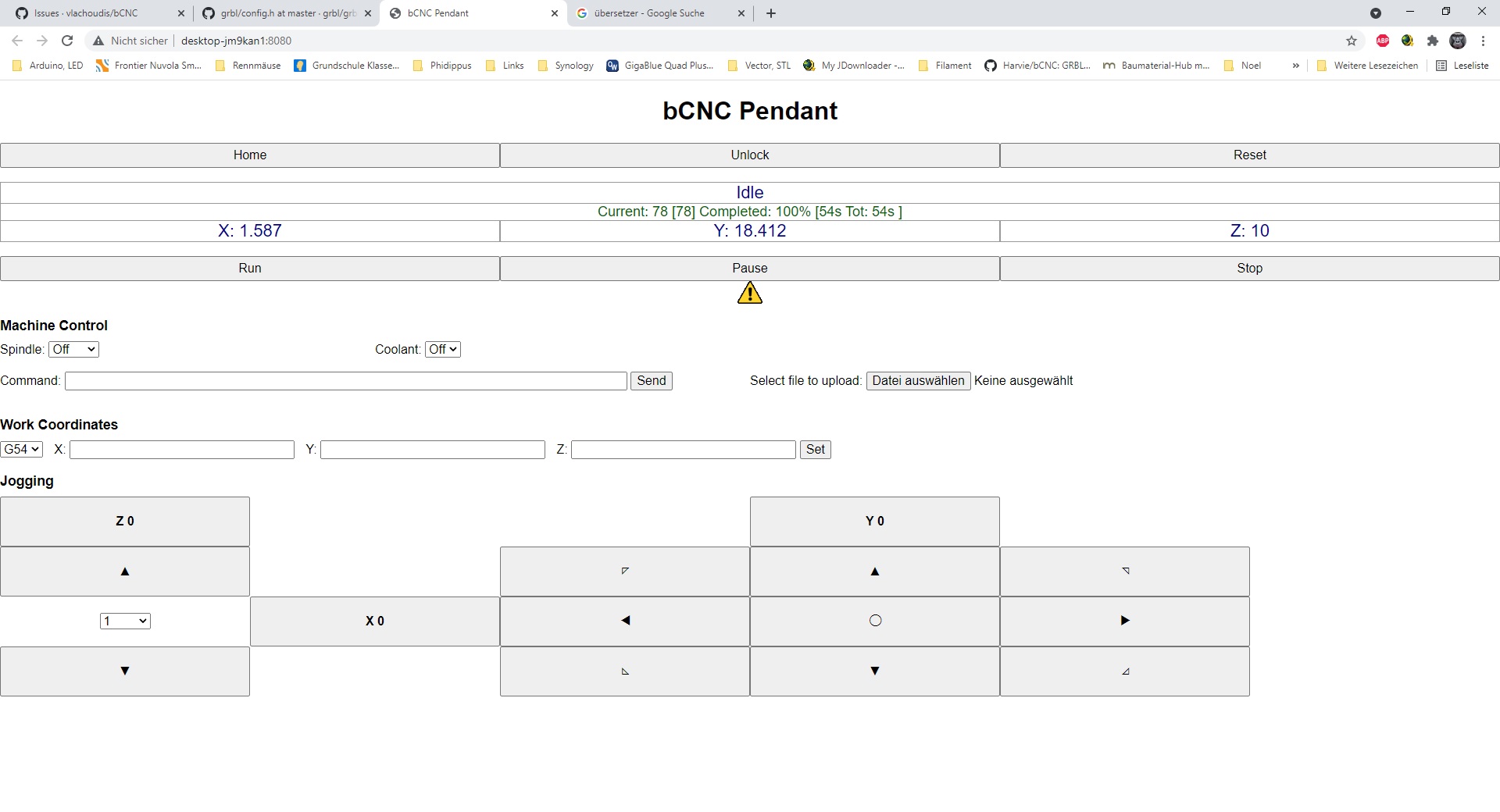
.png "网状挂件,画面闪烁 #1509")
|
我也遇到了与操作视频相同的问题,我在 pi4 上使用铬连接到另一个在局域网上运行 bCNC 的 pi4。 |




新年快乐。
我对 Web Pendant 有疑问。
在 Windows、Linux、Android 和我可以使用的每个浏览器上都是一样的。
bCNC 安装在 Lubuntu 上。
Screen_Recording_20210108-135911_Chrome.mp4