

评论
.jpg "LW-WEBGL:使用 DrawCommands 实现 WEBCAM #139")
|
快速概览;假设您熟悉 ReGL。 对于基本模板,请查看 帧缓冲区允许您绘制纹理; 如果您创建任何对象,那么 |
.jpg "LW-WEBGL:使用 DrawCommands 实现 WEBCAM #139")
|
好的,我会清空看看的:) |
|
嗨,好吧,想做一些测试让相机在工作区中作为图像文档工作(我稍后会弄清楚是否需要),我找到了开始的地方@ workspace.js:236 问题:
|
|
不要使用文档。而是将视频添加到 workspace.js 的 setCanvas() 中的 draw() lambda。
|
对不起,但在哪里?我应该先创建纹理吗? |
|
创建纹理的好地方是在它创建 hitTestFrameBuffer 之后立即在 setCanvas 中。每帧调用一次绘制回调。在调用 this.grid.draw() 之前是填充纹理、处理它并绘制结果的好地方。 |
|
我刚刚想通了:) 在 REGL 中,我使用了多个帧缓冲区来转储结果,因为我不知道如何在单个帧缓冲区上执行此操作。 我怎样才能在 LWGL 上做到这一点? |
|
多个帧缓冲区可能是最简单的。在创建 hitTestFrameBuffer 的地方创建帧缓冲区。 |
|
如何将结果帧缓冲区转储到画布?使用图像纹理 = 帧缓冲区纹理? |
|
最简单的方法是使用 drawCommands.image() 并将其传递给帧缓冲区的纹理成员。 |
|
@tbfleming将此行https://github.com/LaserWeb/LaserWeb4/blob/dev-es6/src/draw-commands/webcam.js#L118从 REGL 翻译成 LWGL 的方法是什么? 我现在有 let data = drawCommands.createBuffer(new Float32Array([0, 1, 2],[0, 2, 3],[2, 1, 0],[3, 2, 0]));
return ({lens, fov, texture }) => {
drawCommands.execute({
program,
primitive: drawCommands.gl.TRIANGLES,
uniforms: { uLens:lens, uFov: fov, uSampler: texture },
buffer: {
data,
 stride: 0,
 offset: 0,
 count: 4,
},
});
};
https://github.com/jorgerobles/LaserWeb4/tree/workspace_video上的错误实现 |
|
LWGL 不支持元素,因此您必须手动扩展数据数组。原文中的 0-3 是https://github.com/LaserWeb/LaserWeb4/blob/dev-es6/src/draw-commands/webcam.js#L100和https://github.com/LaserWeb/LaserWeb4的索引/blob/dev-es6/src/draw-commands/webcam.js#L106 展开后,您应该得到 12 个顶点。每个顶点将包含 aVertexPosition.x、aVertexPosition.y、aVertexPosition.z、aTextureCoord.x、aTextureCoord.x。 |
|
对不起,我没听懂。? elements: [0, 1, 2],[0, 2, 3],[2, 1, 0],[3, 2, 0] vertexCoords: -1.0, -1.0, 0.0, 1.0, -1.0, 0.0, 1.0, 1.0, 0.0, -1.0, 1.0, 0.0 textureCoords: 0.0, 0.0, 1.0, 0.0, 1.0, 1.0, 0.0, 1.0 所以它会是… let data = drawCommands.createBuffer(new Float32Array([ [-1.0, -1.0, 0.0, 0.0, 0.0],//index 0 [1.0, -1.0, 0.0, 1.0, 0.0],//index 1 ...] )); 一个怎么样 stride: 0, offset: 0, count: 4, |
|
我结束了 let data = drawCommands.createBuffer(new Float32Array([
[-1.0, -1.0, 0.0, 0.0, 0.0 ], [1.0, -1.0, 0.0, 1.0, 0.0], [1.0, 1.0, 0.0, 1.0, 1.0],
[-1.0, -1.0, 0.0, 0.0, 0.0 ], [1.0, 1.0, 0.0, 1.0, 1.0], [-1.0, 1.0, 0.0, 0.0, 1.0],
[1.0, 1.0, 0.0, 1.0, 1.0], [1.0, -1.0, 0.0, 1.0, 0.0], [-1.0, -1.0, 0.0, 0.0, 0.0 ],
[-1.0, 1.0, 0.0, 0.0, 1.0], [1.0, 1.0, 0.0, 1.0, 1.0], [-1.0, -1.0, 0.0, 0.0, 0.0 ]
]));
return ({lens, fov, texture }) => {
drawCommands.execute({
program,
primitive: drawCommands.gl.TRIANGLES,
uniforms: { uLens: lens.map(parseFloat), uFov: fov.map(parseFloat), uSampler: texture },
buffer: {
data,
stride: 0,
offset: 0,
count: 4,
},
});
};
|
|
data: 看起来不错,只是它必须是一维数组。 |
|
有用!!!! 还有一件事。图像出现垂直翻转。如果每个“过滤器”都翻转输出,我会更喜欢。 谢谢! |
是的 垂直翻转:更改: 到 |
|
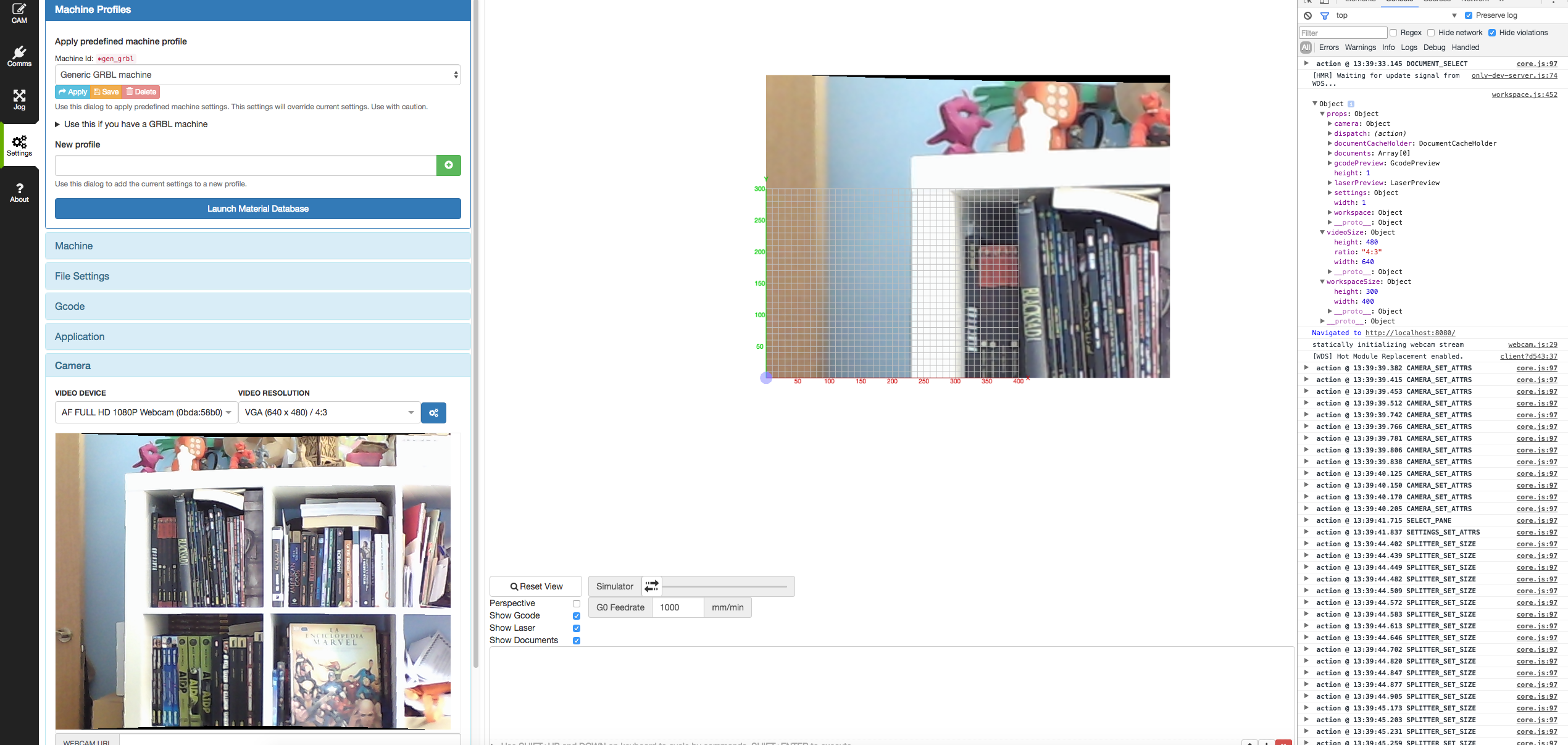
似乎与工作区大小有关。如果窗格被移动,图像改变偏移 O_o |
.png "LW-WEBGL:使用 DrawCommands 实现 WEBCAM #139")
|
如果我理解正确,我们可以关闭这个问题(我们可以绘制,它的效果堆栈仍然是待办事项?)(也就是从#30中的上次更新继续? |
|
是的,这个问题与 lwgl 的使用文档有关。主要障碍不仅是 lwgl(作为受 regl 启发的重写、抽象),还有 webgl 的使用。因此,Todd 在这个领域的工作非常棒,我怀念使用脚踏实地的库作为 threejs,只是为了像我这样天赋较差的开发人员。所以关闭它。El 3 月 5 日 2017 16:40,“Peter van der Walt”<notifications@github.com> escribió:如果我理解正确,我们可以关闭这个问题(我们可以绘制,它的效果堆栈仍然是待办事项?)(aka continued from last update在#30 < #30 >?——你收到这封邮件是因为你发表了评论。直接回复这封邮件,在 GitHub < #139 (comment) > 上查看它,或者将线程静音 <https://github.com/notifications/unsubscribe-auth/ABoIYMVDquDmEbP_syErfAFKSbFfK6U9ks5ritdlgaJpZM4L2nEu >。
|




没有提供说明。