Contact me: hankecnc@gmail.com

平铺步骤之间的开始条件 #159

推推 grbl 3年前 (2023-02-03) 288次浏览
关闭
amoineau 打开了这个问题 2020 年 11 月 10 日 · 59条评论
关闭

平铺步骤之间的开始条件#159

amoineau 打开了这个问题 2020 年 11 月 10 日 · 59条评论

注释

平铺步骤之间的开始条件 #159

语境

我正在使用激光切割机,但目的是切割比机器更长的织物形状。我们使用带 arduino 板的传送带在切口之间移动纸张。添加“tile”功能对我们来说真是幸运。

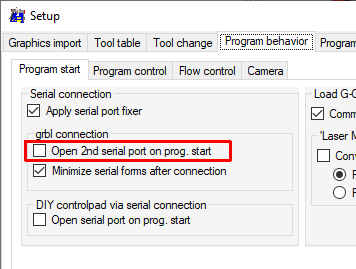
我向 GRBL-plotter 添加了第二个串行通信,以便与 arduino 板通信。但是,现在我必须在正确的时间手动暂停流程,发送命令以移动传送带并恢复流程。

要求的功能

我想知道是否有办法在等待传送带的同时将流程置于瓷砖之间。

该过程将是:(
绘图仪)做瓷砖 n >(绘图仪)发送“顶部”并等待 >(Arduino)读取“顶部”并移动传送带 >(Arduino)发送“顶部”>(绘图仪)做瓷砖 n + 1 >环形…

理想情况下,GRBL 会在等待传送带时自动归位。

谢谢您的帮助 !

平铺步骤之间的开始条件 #159 amoineau 添加了 增强 标签 2020 年 11 月 10 日
平铺步骤之间的开始条件 #159
所有者

原则上它已经实现但从未测试过:
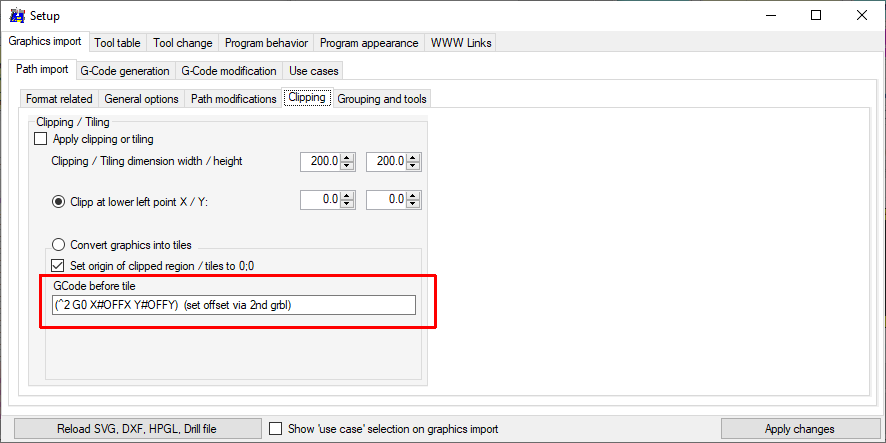
变量#OFFX 和#OFFY 包含实际图块的偏移量(索引 * 大小),#INDX 和#INDY 包含图块的索引。
“(^2” 将控制第二个 arduino,该行必须以“)”结束,以作为第一个 arduino 的注释处理。
平铺步骤之间的开始条件 #159

平铺步骤之间的开始条件 #159
作者
阿莫诺 评论了 2020 年 11 月 12 日  

对不起,我不明白……这将如何阻止拼贴过程进入下一个拼贴?
但是,如果我理解正确,我可以使用此文本框在每个图块后向第二个设备发送串行消息,例如 (^2 DOSOMETHING)?如果是这样,您如何选择目标(COM 端口)?

平铺步骤之间的开始条件 #159
所有者

这将如何阻止拼贴过程转到下一个拼贴?

预期过程(从未测试过):

  1. 向第二个arduino发送定位命令,等待第二个arduino空闲(来自文本框的命令)
  2. 将瓷砖命令发送到第一个 arduino,直到瓷砖完成
  3. 重复步骤 1

平铺步骤之间的开始条件 #159

平铺步骤之间的开始条件 #159
作者
阿莫诺 评论了 2020 年 11 月 18 日  

只是让您知道,我们上周决定暂时搁置平铺功能,以专注于单个页面和工具更改。
如果你同意的话,我会让这个问题开放,直到我可以回去花时间尝试解决我的问题。

平铺步骤之间的开始条件 #159
作者

嗨,其他一切大部分都在工作,所以我们回到平铺过程。
在深入研究软件之前,我想测试一下这个过程。
因此,在同步传送带和 grbl 之前,我希望能够在图块之间进行简单的暂停以手动处理转换。
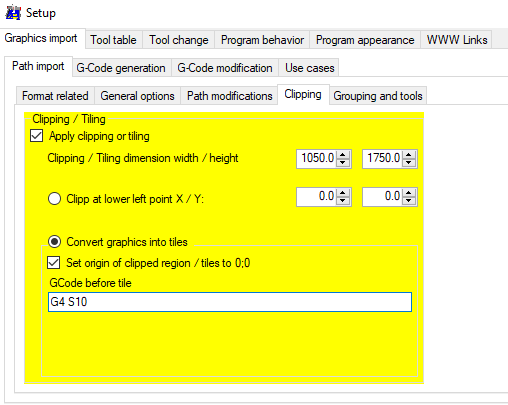
我尝试了以下设置:

平铺步骤之间的开始条件 #159

但未插入 gcode。我也尝试过 M0。顺便问一下,是否有一个命令会暂停直到发送另一个命令?

平铺步骤之间的开始条件 #159
所有者

这是一个错误,您可以通过将代码替换为以前的版本来删除“graphicRelated.cs”第 472 至 479 行中的“改进” – 希望有效:

/* group objects by color/width/layer/tile-nr */
			if (graphicInformation.GroupEnable)
			{	//if (!graphicInformation.OptionClipCode)
                                GroupAllGraphics(graphicInformation);
				return Graphic2GCode.CreateGCode(groupedGraphic, headerInfo, graphicInformation);
			}

平铺步骤之间的开始条件 #159
作者

好,我会试试 !

平铺步骤之间的开始条件 #159
作者

我在代码中得到的最接近的是第 1584 行:

平铺步骤之间的开始条件 #159

平铺步骤之间的开始条件 #159
所有者

这太低了。它位于“graphicRelated.cs”中“public static string CreateGCode()”的末尾

平铺步骤之间的开始条件 #159
所有者

请撤消“graphicRelated.cs”中“public static string CreateGCode()”末尾的更改。
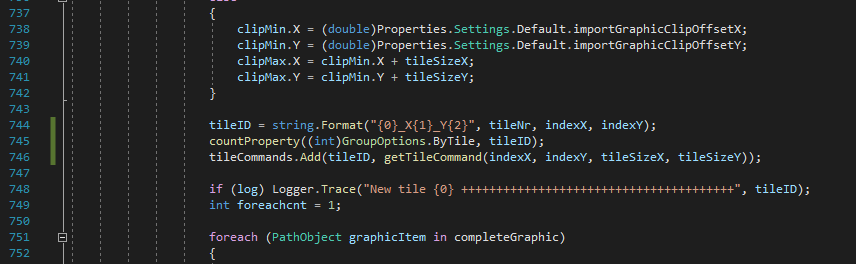
而是在第 784 行周围插入“countProperty((int)GroupOptions.ByTile, tileID);”
前:

tileID = string.Format("{0}_X{1}_Y{2}", tileNr, indexX, indexY);
tileCommands.Add(tileID, getTileCommand(indexX, indexY, tileSizeX, tileSizeY));

后:

tileID = string.Format("{0}_X{1}_Y{2}", tileNr, indexX, indexY);
countProperty((int)GroupOptions.ByTile, tileID);
tileCommands.Add(tileID, getTileCommand(indexX, indexY, tileSizeX, tileSizeY));

平铺步骤之间的开始条件 #159
作者

这是一个错误,您可以通过将代码替换为以前的版本来删除“graphicRelated.cs”第 472 至 479 行中的“改进” – 希望有效:

/* group objects by color/width/layer/tile-nr */
			if (graphicInformation.GroupEnable)
			{	//if (!graphicInformation.OptionClipCode)
                                GroupAllGraphics(graphicInformation);
				return Graphic2GCode.CreateGCode(groupedGraphic, headerInfo, graphicInformation);
			}

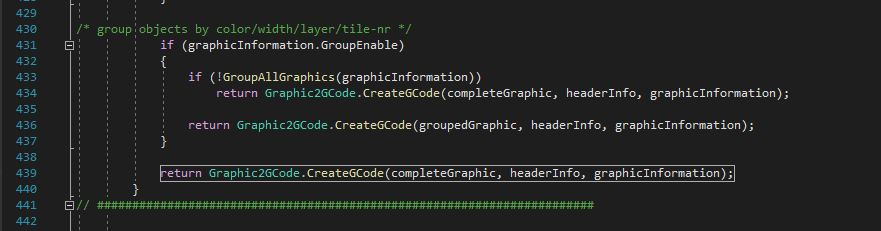
好的,我想我找到了,但它是第 430 行:

平铺步骤之间的开始条件 #159

但实际上我在这里没有改变任何东西,是吗?

平铺步骤之间的开始条件 #159
作者
阿莫诺 评论了 2020 年 12 月 3 日  

相反,我改变了这个?:

平铺步骤之间的开始条件 #159

(我似乎有 40~ 行与你偏移)

为此:

平铺步骤之间的开始条件 #159

平铺步骤之间的开始条件 #159
作者
阿莫诺 评论了 2020 年 12 月 3 日  

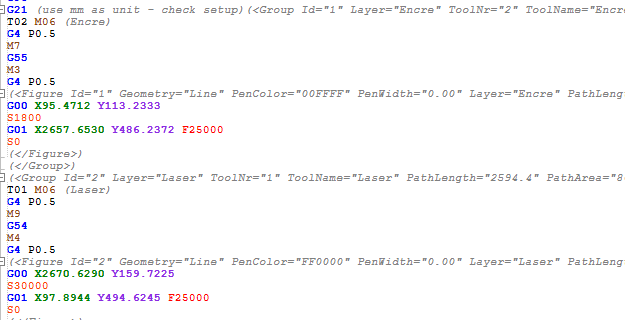
是的,我有 gcode,但我丢失了刀具更改和“从刀具表中获取进给率和主轴”。
虽然它仍然可以根据原始图层识别每个形状,这很好,但我担心它会丢失这些信息。但它不按它行事。

平铺步骤之间的开始条件 #159

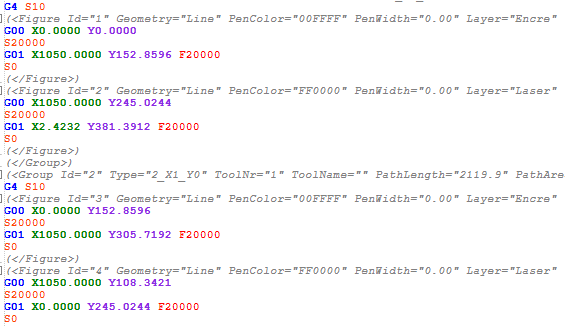
在这里,我有一个交叉使用这两种工具跨越几个图块。我们可以看到瓷砖之间的停顿,其中一条线在激光层上,另一条线在油墨层上,但我没有换刀操作或我通常在工作时使用的正确进给率/主轴“单块”(无块)。

为了进行比较,这是简单地取消选中“应用剪裁或平铺”时的情况:

平铺步骤之间的开始条件 #159

平铺步骤之间的开始条件 #159
作者

这并不重要,只是想让您知道,它们是平铺设置页面上的两个拼写错误。在工具提示中“draen”而不是“drawn”,其中一个选项是“Clipp”而不是“Clip”。

平铺步骤之间的开始条件 #159
所有者

到目前为止,它要么是 tiles 要么是 toolchange – 检查 graphic2Gcode.cs around line 135:
只需删除“else”,它可能会起作用

                if (graphicInfo.GroupOption == GroupOptions.ByTile)
                {
                    if (logEnable) Logger.Trace("-CreateGCode  try to insert Tile command {0}", groupObject.key);
                    if (Graphic.tileCommands.ContainsKey(groupObject.key))
                    { finalGcodeString.AppendLine(Graphic.tileCommands[groupObject.key]); }
                }
                else
                {
                    if (logEnable) Logger.Trace("CreateGCode-Group  toolNr:{0}  name:{1}", groupObject.toolNr, groupObject.toolName);

                    ToolChange(groupObject.toolNr, groupObject.toolName);   // add tool change commands (if enabled) and set XYFeed etc.
                }

平铺步骤之间的开始条件 #159
作者

如果我简单地删除 else,我不会在不平铺时丢失 toolchange 吗?

平铺步骤之间的开始条件 #159
所有者

不,但要确保你也可以删除第二个块周围的括号

                if (graphicInfo.GroupOption == GroupOptions.ByTile)
                {
                    if (logEnable) Logger.Trace("-CreateGCode  try to insert Tile command {0}", groupObject.key);
                    if (Graphic.tileCommands.ContainsKey(groupObject.key))
                    { finalGcodeString.AppendLine(Graphic.tileCommands[groupObject.key]); }
                }
                if (logEnable) Logger.Trace("CreateGCode-Group  toolNr:{0}  name:{1}", groupObject.toolNr, groupObject.toolName);

                ToolChange(groupObject.toolNr, groupObject.toolName);   // add tool change commands (if enabled) and set XYFeed etc.

平铺步骤之间的开始条件 #159
作者
阿莫诺 评论了 2020 年 12 月 11 日  

yeah I understood that once I woke up for good… I came back to rectify. Obviously you meant that…
(I don’t know why but in my head “remove the else” meant put the statements inside the if.)

平铺步骤之间的开始条件 #159
Author

The graphic is tiled, I have the “between tiles command” and the tool change commands. But the tool changes don’t occur when

喜欢 (0)