关闭 Makasudali 打开了这个问题 2022 年 7 月 20 日 · 1条评论 关闭 从同一窗口插入或更新文本。#300 Makasudali 打开了这个问题 2022 年 7 月 20 日 · 1条评论 评论 马卡苏达利 评论了 2022 年 7 月 20 日 嗨,朋友 用户需要打开另一个窗口来插入文本,而不是可以在同一窗口上的任何选项插入或更新文本或任何其他控件。谁能指导我如何使用现有代码进行上述更改。 来自 Create Gcode Btn Control 的代码。 =========================public void CreateText() { PathBackground.Reset(); 路径 = 路径背景; 路径.StartFigure(); float x, y; x = (float)10; y = (float)10; GetOffset(x, y); path.AddLine(offsetX, offsetY, offsetX + x, offsetY); // create background path path.AddLine(offsetX + x, offsetY, offsetX + x, offsetY + y); path.AddLine(offsetX + x, offsetY + y, offsetX, offsetY + y); path.AddLine(offsetX, offsetY + y, offsetX, offsetY); if (cBFont.SelectedIndex < 0) { MessageBox.Show("Please select a font", "Error"); return; } Logger.Trace(culture, " createText() "); SaveSettings(); GCodeFromFont.Reset(); GCodeFromFont.GCText = tBText.Text; GCodeFromFont.GCFontName = cBFont.Items[cBFont.SelectedIndex].ToString(); GCodeFromFont.GCHeight = (double)nUDFontSize.Value; GCodeFromFont.GCFontDistance = (double)nUDFontDistance.Value; GCodeFromFont.GCLineDistance = (double)(nUDFontLine.Value / nUDFontSize.Value); GCodeFromFont.GCSpacing = (double)(nUDFontLine.Value / nUDFontSize.Value) / 1.5; GCodeFromFont.GCPauseChar = cBPauseChar.Checked; GCodeFromFont.GCPauseWord = cBPauseWord.Checked; GCodeFromFont.GCPauseLine = cBPauseLine.Checked; GCodeFromFont.GCConnectLetter = cBConnectLetter.Checked; VisuGCode.pathBackground.Reset(); Graphic.CleanUp(); Graphic.Init(Graphic.SourceType.Text, "", null, null); Graphic.graphicInformation.OptionNodesOnly = false; Graphic.graphicInformation.OptionSortCode = false; Graphic.graphicInformation.OptionZFromWidth = false; Graphic.graphicInformation.FigureEnable = true; Graphic.graphicInformation.GroupEnable = true; Graphic.graphicInformation.GroupOption = Graphic.GroupOption.ByType; Graphic.SetType("Text"); if (Properties.Settings.Default.createTextLineBreakEnable) GCodeFromFont.GetCode((double)nUDLineBreak.Value); // do automatic page break else GCodeFromFont.GetCode(0); // no page break if (RbAlign2.Checked) Graphic.AlignLines(1); // 0=left, 1=center, 2=right else if (RbAlign3.Checked) Graphic.AlignLines(2); // 0=left, 1=center, 2=right Graphic.CreateGCode(); // result is saved as stringbuilder in Graphic.GCode; } 所有者 svenhb 评论了 2022 年 7 月 20 日 同一窗口上的任何选项以插入… 同样在这里: svenhb已完成 关闭 2022 年 8 月 12 日 喜欢 (0) Error when compiling source code #298 标尺数字显示和插入文本选项单一窗口。 #301 v1.3.8-EDGE 重启后键盘快捷键消失 #427 关闭 无法在 gsender 1.2.0 中打开 .gcode 文件 #367 RaspberryPi 运行 gsender 时出现问题 #89 向 fluidnc 发送 $$ 会导致 gsender 崩溃 #473 v1.3.8-EDGE 重启后键盘快捷键消失 #427 关闭无法在 gsender 1.2.0 中打开 .gcode 文件 #367RaspberryPi 运行 gsender 时出现问题 #89向 fluidnc 发送 $$ 会导致 gsender 崩溃 #473功能请求:抑制发送到机器的 gcode 中的 gcode 注释。 #444 关闭通过网络连接进行连接 #171操纵杆运动的剩余问题 #204 关闭新版本认为我的机器一直处于锁定状态 #474 关闭
.png "从同一窗口插入或更新文本。 #300")


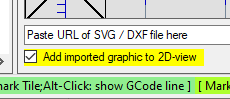
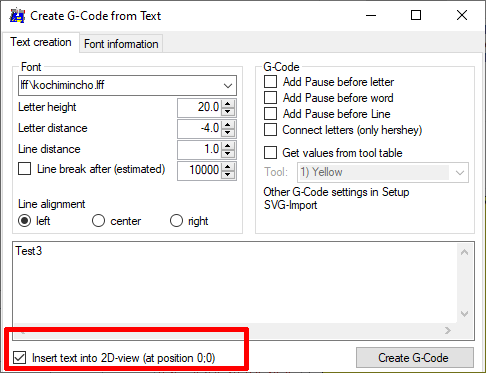




嗨,朋友
用户需要打开另一个窗口来插入文本,而不是可以在同一窗口上的任何选项插入或更新文本或任何其他控件。谁能指导我如何使用现有代码进行上述更改。
来自 Create Gcode Btn Control 的代码。
=========================public void CreateText()
{
PathBackground.Reset();
路径 = 路径背景;
路径.StartFigure();