

Comments
.png "Frustrated and a few questions #45")
|
what especially is your problem? you could copy the Gcodes that the webUI outputs and put them manually in laserGRBL (https://lasergrbl.com/usage/user-interface/ see #3). could you post the full (verbose) output of the webUI please (attach it as text file please). I got the 1.1 and now the 2.0 and both work fine over wifi/webUI. did you try to set your wifi settings via ESP commands (ESP100, ESP101, ESP110, ESP115) instead of using the touch screen? |
.png "Frustrated and a few questions #45")
|
Well, really understood what I wrote? Where is the difference between the V1.0 and the 2.0 To understand, what is missing in this image (the WebUI) what I have on the display however? |
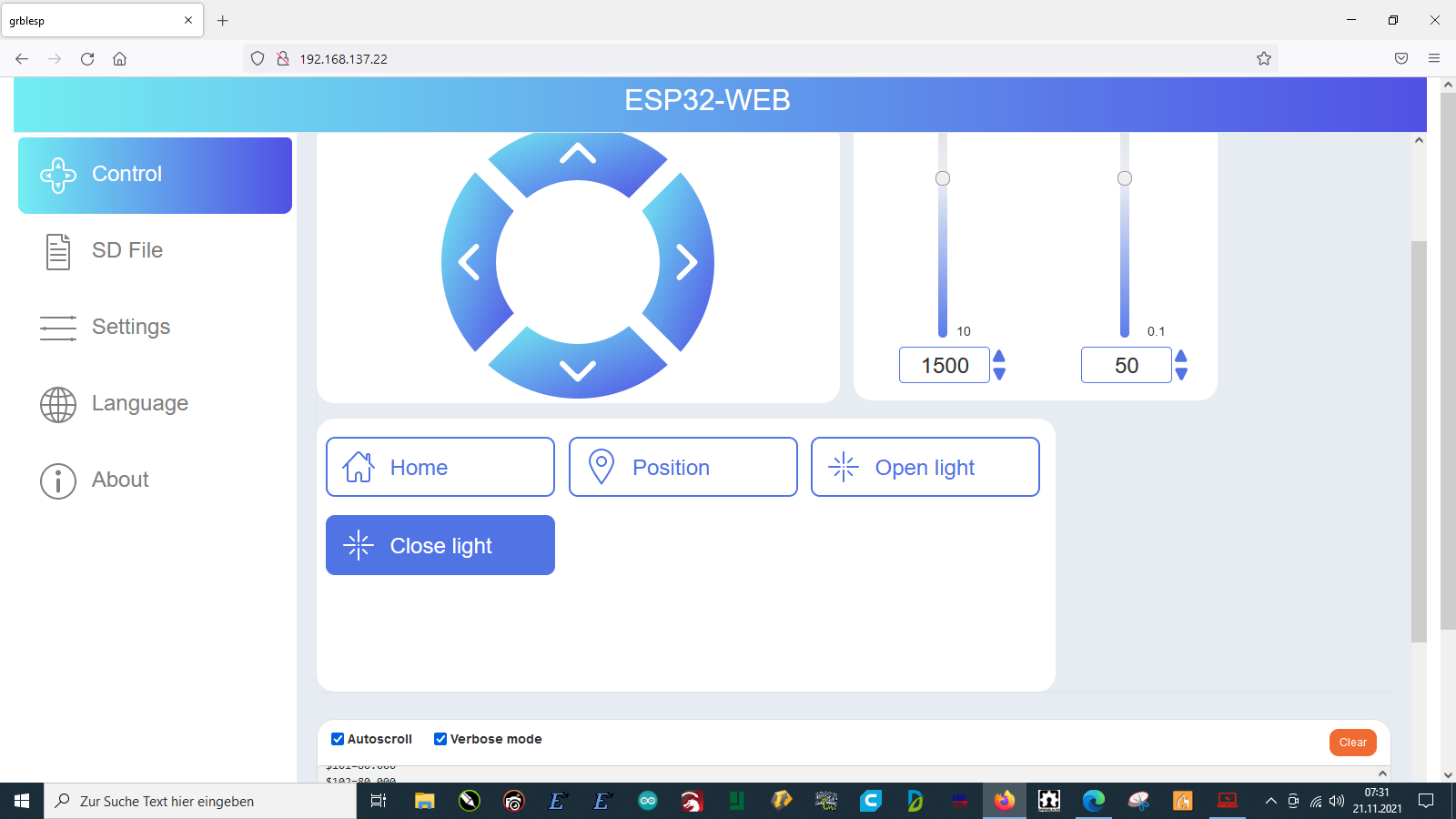
|
Since you write things like “it should funktionieren”: Ja, als Softwareentwickler und nach einigen Jahren Erfahrung weiß ich sehr gut, was eine Doku ist, wie man sie schreibt, wie man mit solchen Problemen umgeht. Dass das Webinterface nicht alles kann ist doof, aber ändern kannst du es nicht. Ich meine, wir sprechen hier über einen 30 Euro Controller aus China. Wenn es dir wichtig ist an der Firmware was zu ändern, an der Webseite oder neue Features zu implementieren, dann nimmt dir GRBL und pack es selbst auf einen Arduino oder ESP32. Du hast eine Version 1.1 gekauft und im Vergleich dazu ist die 2.0 schon viel besser. Makerspace arbeitet doch dauernd an neuen Versionen aber das WebUI halt halt keine so hohe Priorität, wie ich das sehe. “why is the statement that these are still being implemented.”. Wieso brauchst du auch unbedingt das WebUI? Gravierst du von der SD-Karte aus? Was ich eben NICHT verstanden habe: Hast du neben dem 1.1 noch ein zweites BOARD 2.0 gekauft oder hast du die Firmware 2.0 auf das Board 1.1 drauf gemacht? Nein, es gibt keine Releasenotes, wo du direkt 1.1 und 2.0 vergleichen kannst. Und nachgucken kannst du auch nicht weil es nicht open source ist. Das Produkt ist halt “as is” und ende. Ob das gut ist oder nicht, das musst du wissen. Ich benutze alle Laser/CNCs an einem PC, mit LaserGRBL, Lightburn etc. |
|
Hallo und Danke für Deine Antwort. Ach, ich habe es nicht verstanden und Dir ist egal ob ich da eine WebUI nutzen möchte? Entschuldigung….Support, Informationen und Dokumentationen sehen für mich ganz anders aus. Dann hätte man dies mitteilen können und wie Du siehst ist auch zum DLC 2.0 keine richtige und eindeutige Information und Dokumentation vorhanden. Persönlich und dies konntest Du erlesen habe ich einen DLC 1.0 und habe die Version für den DLC 2.0 geflasht. Wir sind hier bei: billig nachschieben! Mir muss niemand erzählen was eine Dokumentation ist, ein funktionierendes System und wenn ich schon nicht in der Lage bin etwas sauber zu programmieren gibt man dies der Masse. Den Rest darf das Volk machen aber wie? Meine Aufgabe ist es bestimmt nicht irgendwo in der Firmware zu wurschteln! Einer der Kaufgründe war diese Option! Es ist nur meine Meinung aber ich wette damit stehe ich nicht allein! Flashen geht ja prima und etwas anders als hier beschrieben und verlinkt….wir sind bei der Dokumentation die nach wie vor sehr mies ist. So, ich habe meine Meinung geteilt und keinen Frust. Danke und einen schönen Sonntag |
|
Ja, das habe ich verstanden. Doch, open source würde hier helfen. Dann könnte die Community oder man selbst vieles anpassen oder neu implementieren. Du tust gerade so, als hättest du tausende Euro für eine Industriemaschine bezahlt. Ein Teil für… 20 Euro?… funzt net so wie du willst. Dann schick es zurück oder schreib es ab. Ich hab ja nichts dagegen gesagt, dass du dein Geld zurück verlangst. Das steht dir ja zu. Dass dich meine Erfahrung nicht juckt ist mir auch egal, aber DU fragtest, ob ich weiß was Doku etc. sind. Nicht jede Software ist gut, nicht jedes Produkt funzt wie gewohnt. |
|
@Plottmania Sorry for delay. The webUI is available. I don’t know exactly what kind of problem you encountered? You mentioned that another question should be that the wifi password needs to be re-entered after the power is turned on again? This problem has been fixed in the two versions of https://github.com/makerbase-mks/MKS-DLC32/tree/main/firmware/TFT35/Laser/Normal/Board_V2.0, of course, it is recommended to use the latest compilation version of. |
|
Hallo 21mac, Nach wie vor stehe ich zu den Produkten von MakerBase aber wieso werden unterschiedliche Displays ausgeliefert, kein Reset und andere Kleinigkeiten? Open Source, würde ich gern betreiben nur hab ich davon keinen Plan. Da lobe ich mir einen xPro V5 wenn auch eine ganz andere Preisliga. https://plottmania.de/forum/board/39-makerbase-dlc/ Ich bau zurück, guck was da mit FluidNC geht und versuche dies zu verstehen. Danke nochmals für Deine Meinung und bitte nicht falsch verstehen…ich habe wie gesagt die Baureihen der DLC gefressen und würde behaupten sie hätten für mich kein Geheimnis mehr. Ich kaufe auch nur ungern ein Auto mit 6 Gängen von denen ich eventuell nur 5 Gänge nutzen kann…wo ist da also der Unterschied außer preislich? Na, mal probiert mit dem Verkäufer “MakerBase” über AliExpress? |
Sorry but the question was quite different! I’ve pretty much slapped every update on the DLC32 V1.0 but unfortunately I don’t know Chinese. Regards Stephan DeeplTranslate…sorry |
|
I just see there was an update for the DLC32 V 1.0 (Laser) just 5 minutes ago Thanks https://github.com/makerbase-mks/MKS-DLC32/tree/main/firmware/TS35/Laser/Normal/Board_V1.0 |
|
@Plottmania Thanks for your advice! But I found the function on Barton’s is similar with ours. I mean functions, of cause, it has some different details . And we also hope you can put forward more valuable opinions |
|
Hello,
A dream would be even: You can display this beautifully on a 7 inch display and I bet these options are the desire of many. This system, so set and easy to set..I claim a best seller would be! Thanks again for the replies. Translated with http://www.DeepL.com/Translator (free version) |
|
a small update after the update… |
Thanks for your good advices again! In response to the suggestions you listed, we have confirmed:
|
|
It’s more of a gimmick for me because I have multiple systems. I will try both versions of the DLC (V1.0 with display and V2.0 via WebUI) this weekend. Thanks for the additions and a feedback from me if it works comes. Thumbs up… |
.jpg "Frustrated and a few questions #45")
|
I tried to update the firmware of my DLC32 V1.0 but no update worked and nothing happend. The actual firmware doesnt support a z-axis and thats what I need for the motorised laserbed. |
one very polite question: “no update worked and nothing happened” is not very helpful. how did you update it? Tell us step by step. which firmware did you use? be aware that you can ONLY use the firmware marked as “board_v1.0”. which configuration file? did you do any changes? the more you tell us the better we can help you. Thank you |
|
well here are the details. I saved the bin-file to the sd-card, put it in the slot and turned on the board. But the board starts normally without any update. I tried it with or without the MKS config-file and any bin-file for V1.0 but nothing. I did all changes from Lightburn and this worked fine. I used the basic-config because no file was accepted. The webinterface is also working but not really helpful for z-axis. X and Y ist fine on the display and the web-interface but no z-axis at all. where can I get the installed versionnumber? the board is working and starting but not updating. The display is a TFT35 V2.0-R |
|
Markus, es bringt Dich nicht weiter weil auf der anderen Seite jemand sitzt mit immer den gleichen Fragen. Ich kau da gerade auch böse drauf rum aber habe noch diverse Controller die sehr viel besser sind aber wenn es funktioniert will man sich nicht mit noch mehr Kram beschäftigen. |
|
vielen Dank. Hier sind nun alle Daten: Die Steuerung über Lightburn sollte möglich sein, aber klappt derzeit noch nicht. Ich wollte daher die Z-Achse direkt über das MKS-Board steuern. Die Voraussetzung wäre hierfür nur die entsprechenden Button auf dem Display zu haben. Ich habe gelesen, dass es in der finalen Firmware die Z-Steuerung geben soll und die wollte ich installieren und hoffe darauf einen Tipp zu bekommen wie ich die Firmware runter oder aid andere drüber bekomme. |
|
LightBurn ist da ein bisschen grausam… : ) Die MKS Firmware bekommst Du einfach mit dem MKS Tool auf den Controller. |
|
ja, die Z-Achse ist aktiviert. |
.jpg "Frustrated and a few questions #45")
|
The latest Update Support the z Axis but it has a lot of new issues. A few days ago i Received a Mail from Makerbase that they are fixing all reported issues and will publish a new Update in September.I retured this shit to Amazon. Gesendet von Yahoo Mail auf Android Am Mi., Aug. 31, 2022 at 21:21 schrieb ***@***.***>: I tried to update the firmware of my DLC32 V1.0 but no update worked and nothing happend. The actual firmware doesnt support a z-axis and thats what I need for the motorised laserbed. I hope anyone can give me an idea. Thanks a lot. — Reply to this email directly, view it on GitHub, or unsubscribe. You are receiving this because you are subscribed to this thread.Message ID: ***@***.***>
|
.png "Frustrated and a few questions #45")
.png "Frustrated and a few questions #45")




Hello,
I have been dealing with products from MakerBase for quite some time : )
Especially the MKS DLC has done it to me but now I have to ask!
My DLC 32 V1.1 (so it is shown in the display) works via the WebUI but when I start this I have the feeling that I can not do everything!
Bad enough if you have to enter the WiFi password after each restart of the DLC….ich know there other very well functioning systems such as a xPro V5 just as an example.
Now should come an UpDate but what comes?
A version for the MKS DLC 32 V2.0 which I have of course also tried times….Horror!
To the understanding, I have here a diode laser at a X-Y system (no core) and thus per axis a motor.
I can use LightBurn without problems via USB, LaserGRBL without problems, use the display which works fine for now but the WebUI is a kick in the butt.
If I now read various answers to questions regarding updates I would have to puke!
One has the feeling MakerBase has no desire for support but is horny for profit.
I have worked my butt off to explain to people how they have to set what and where.
My documentation is much better than the MakerBase documentation on the MKS DLC…fact.
I’ve had the DLC 2.0, the DLC 2.1, the XY DLC and now a DLC32 V1.0 here for two weeks to realize I bought a crutch?
No, I also still buy MKS TMC 2160 and other products…there MakerBase has done everything right : )
I would like to see a proper documentation of the hardware, maintain the software and not throw half-finished products on the market.
Yes, I’m very pissed off because like every noob I bet on a simple and easy to use product which turns out to be a gravedigger.
The question is quite simple and should please be answered professionally!
Is the WebUI for the DLC 32 V1 still extended or come the desired features?
Is there a solution regarding the password and the question of all questions whether there is also a documentation of the hardware?
Here times as a hint the question of what the jumpers on the V1. are or the dips on the V2…..mir is known for what because I played around with it for days!
Do your homework and do not leave people hanging here!!!
For my bad English I would like to apologize, my German is a little better but the few understand here!
My text was translated with Deepl….Thanks