

评论
.jpg "无论我做什么,这个文件都不会用 vsc 编译 #56")
|
|
.png "无论我做什么,这个文件都不会用 vsc 编译 #56")
|
MarlinFirmware/Marlin#15514 |
.png "无论我做什么,这个文件都不会用 vsc 编译 #56")
|
Examples 目录中的 Configuration.h 未使用 Marlin 的配置进行更新。您必须通过 WinMerge 使用默认配置检查 Configuration.h 以进行结构更改;) |
|
感谢您的回复,但不确定我是否理解您的解决方案,您能否更详细地解释一下。谢谢,
|
|
这很简单… 第一行被注释掉了——JUNCTION_DEVIATION 现在被定义为默认值并且不必存在。整个 IF 块现在是无意义的,因为没有 JUNCTION_DEVIATION 的隐式定义,所以它永远不会被遵守,并且总是会缺少 JUNCTION_DEVIATION_MM 值。注释掉这三行将解决这个问题;) 可能会有更复杂的修改,例如 Examples 目录中的 Configuration.h 文件不会经常更新,因此唯一的检查方法是使用 WinMerge 并根据实际 MarlinFW 副本中的版本检查 Configuration.h。 |
.jpg "无论我做什么,这个文件都不会用 vsc 编译 #56")
|
如果您使用的是 Marlin-BugFix-2.x 的最新副本(截至 2019 年 10 月 20 日),您可能需要查看此行周围的 Configuration.h(请参阅下面的文本) 如果启用 Classic_Jerk,则无需担心 JUNCTION_DEVIATION_MM,但如果禁用 Classic_Jerk(这是默认行为),则必须定义 JUNCTION_DEVIATION_MM。 |
.png "无论我做什么,这个文件都不会用 vsc 编译 #56")
|
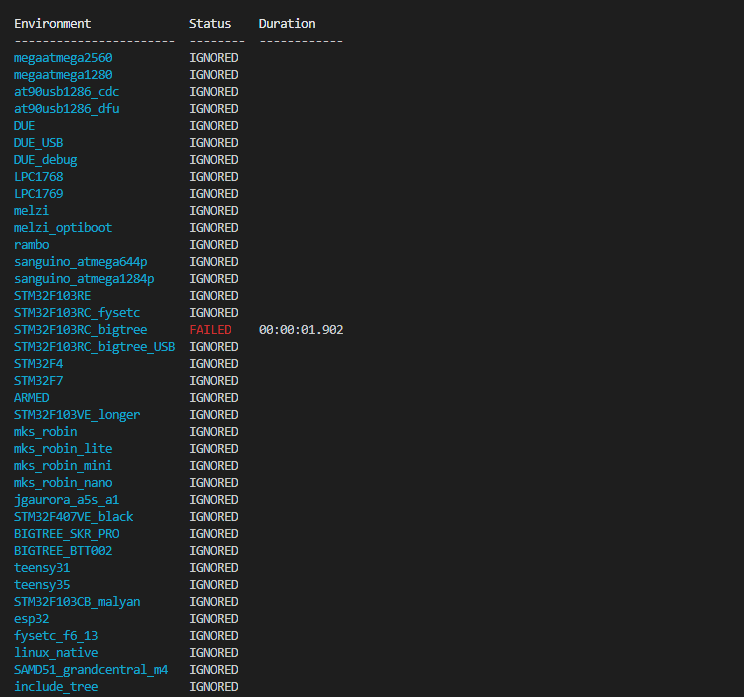
对我来说是 不是 -> default_envs = STM32F103RC_bigtree 这有助于编译它。之前有同样的问题。 |
.png "无论我做什么,这个文件都不会用 vsc 编译 #56")
它对我不起作用! |
|
我通过以管理员身份运行 vsc 来让它工作。右键单击该图标,然后单击以管理员身份运行。
|
|
嗨,威廉姆斯
刚刚试过了 – 没有变化。我将我的 platformio.ini 和 config.h 与最新的 BTT 自述文件进行了比较,它们都匹配。我很茫然。我在终端中收到以下警告消息(黄色):FileNotFoundError: [Errno 2] 没有这样的文件或目录:’f:\00 3D PRINTING\3 ENDER 3 pro\SKR mini E3\0 BTT stuff board ver 1.2\github\BIGTREETECH-SKR-MINI-E3-v1.2- with-BLT-endstop\.pio\libdeps\STM32F103RC_bigtree\_tmp_installing-vfds7bdr-package\U8glib-HAL-bugfix\src\clib\HAL_example_files\LCD_I2C_routines.c.example’:
|
|
2019 年 10 月 24 日星期四上午 11:59 Brad Harned ***@***.***> 写道:大卫,我现在在工作,但我回家后会把它给你。你安装了 git 吗?https://git-scm.com/downloads 2019 年 10 月 24 日星期四上午 11:47 meltonpieman ***@***.***> 写道: > 嗨,William re > > 我通过以管理员身份运行 vsc 使其工作。右键单击 > 图标,然后单击以管理员身份运行。> … <#m_-402608059743745954_m_-3454582288821006061_> > > 刚刚试过了 – 没有变化。我将我的 platformio.ini 和 config.h > 与最新的 BTT 自述文件进行了比较,它们都匹配。我很茫然。我在终端中收到 > 以下警告消息(黄色):FileNotFoundError: > [Errno 2] No such file or directory: ‘f:\00 3D PRINTING\3 ENDER 3 pro\SKR > mini E3\0 BTT stuff board ver > 1.2\github\BIGTREETECH-SKR-MINI-E3-v1.2-with-BLT-endstop\.pio\libdeps\STM32F103RC_bigtree\_tmp_installing-vfds7bdr-package\U8glib-HAL-bugfix\src\clib\HAL_example_files\LCD_I2C_routines。 c.example’: > 文件 > “C: self._afo.extract(item, dest_dir) > 文件“C:\Users\exken.platformio\python37\Lib\zipfile.py”,第 1602 行:> return self._extract_member(member, path, pwd) > 文件“C :\Users\exken.platformio\python37\Lib\zipfile.py”, line 1673: > open(targetpath, “wb”) as target: > > 你收到类似的信息了吗?> 我是否遗漏了一些关于将丢失的文件放置到位的基本知识?> 能否将您的 platformio.ini 的文本副本发送给我,以便我可以 > 将其与我的进行比较?> > David > > — > 您收到此邮件是因为您是该线程的作者。> 直接回复此邮件,在GitHub上查看 > < 您收到此消息是因为您创作了该线程。> 直接回复此邮件,在GitHub上查看 > < 您收到此消息是因为您创作了该线程。> 直接回复此邮件,在GitHub上查看 > <#56 ?email_source=notifications&email_token=ANRDLO6LYH7HWHXLG46WEHTQQG7S7A5CNFSM4JDHAMFKYY3PNVWWK3TUL52HS4DFVREXG43VMVBW63LNMVXHJKTDN5WW2ZLOORPWSZGOECFQFIY#issuecomment-545981091>, > or unsubscribe > < https://github.com/notifications/unsubscribe-auth/ANRDLOZ4V2LERK6CZQBXEI3QQG7S7ANCNFSM4JDHAMFA > > . >
/** * Marlin 3D 打印机固件 * 版权所有 (c) 2019 MarlinFirmware [ https://github.com/MarlinFirmware/Marlin] * * 基于 Sprinter 和 grbl。* 版权所有 (c) 2011 Camiel Gubbels / Erik van der Zalm * * 本程序是免费软件:您可以根据 * 自由软件基金会发布的 GNU 通用公共许可证的条款重新分发和/或修改 * 它,或者许可证的第 3 版,或 *(由您选择)任何更高版本。* * 本程序的分发是希望它有用,* 但不提供任何保证;甚至没有对 * 适销性或特定用途的适用性的暗示保证。有关详细信息,请参阅 * GNU 通用公共许可证。* * 您应该已经收到 GNU 通用公共许可证的副本 * 以及该程序。如果没有,请参阅 < http://www.gnu.org/licenses/>。* */ #pragma once /** * Configuration.h * * 基本设置,例如: * * – 电子设备类型 * – 温度传感器类型 * – 打印机几何结构 * – 止挡配置 * – LCD 控制器 * – 额外功能 * *高级设置可以在 Configuration_adv.h * */ #define CONFIGURATION_H_VERSION 020000 //================================ ===========================================//===== ========================入门======================== ===== //=========================================== ================================/** * 以下是一些用于校准机器的标准链接: * * http ://reprap.org/wiki/Calibration * http://youtu.be/wAL9d7FgInk * http://calculator.josefprusa.cz *http://reprap.org/wiki/Triffid_Hunter%27s_Calibration_Guide * http://www.thingiverse.com/thing:5573 * https://sites.google.com/site/repraplogphase/calibration-of-your-reprap * http://www.thingiverse.com/thing:298812 */ //============================================== ============================= //=================== ========== DELTA 打印机 =============================== //===== ================================================ ==================== // 对于 Delta 打印机,从 // config/examples/delta 目录中的配置文件之一开始,并为您的机器定制。// //============================================== ============================= //=================== ========== SCARA 打印机 =============================== //===== ================================================ ==================== // 对于 SCARA 打印机,从 // config/examples/SCARA 中的配置文件开始,并为您的机器定制。// // @部分info // 此构建的作者信息在启动期间打印到主机和 M115 #define STRING_CONFIG_H_AUTHOR “(BIGTREETECH, SKR-mini-E3)” // 谁进行了更改。/** * *** 供应商请阅读 *** * * Marlin 允许您为图形 LCD 添加自定义启动映像。* 使用此选项,Marlin 将首先显示您的自定义屏幕,然后是带有版本号和 Web URL 的标准 Marlin 徽标。* * 我们鼓励您利用这一新功能,我们还 * 恭敬地请求您保留未修改的 Marlin 启动屏幕。*/ // 在启动时显示 Marlin 引导屏幕。** 启用生产 ** #define SHOW_BOOTSCREEN // 在启动时在 Marlin/_Bootscreen.h 中显示位图。//#define SHOW_CUSTOM_BOOTSCREEN // 在状态屏幕上显示 Marlin/_Statusscreen.h 中的位图。//#define CUSTOM_STATUS_SCREEN_IMAGE //@部分machine /** * 选择板子上的串行端口用于与主机通信。* 这允许将无线适配器(例如)连接到非默认端口引脚。* 注意:第一个串行端口(-1 或 0)将始终由 Arduino 引导加载程序使用。* * :[-1, 0, 1, 2, 3, 4, 5, 6, 7] */ #define SERIAL_PORT 2 /** * 选择板上的辅助串行端口,用于与主机通信。* 这允许将无线适配器(例如)连接到非默认端口引脚。* 串行端口 -1 是 USB 模拟串行端口(如果可用)。* * :[-1, 0, 1, 2, 3, 4, 5, 6, 7] */ #define SERIAL_PORT_2 -1 /** * 此设置决定了打印机的通信速度。* * 250000 在大多数情况下都有效,但如果 * 您在主机打印期间经常遇到丢失,您可以尝试较低的速度。* 您最多可以尝试 1000000 次以加快 SD 文件传输速度。* * :[2400, 9600, 19200, 38400, 57600, 115200, 250000, 500000, 1000000] */ #define BAUDRATE 115200 // 在 AT90USB 设备上启用蓝牙串行接口 //#define BLUETOOTH // 从开发板上选择名称.h 匹配您的设置 #ifndef MOTHERBOARD #define MOTHERBOARD BOARD_BTT_SKR_MINI_E3_V1_2 #endif // LCD“就绪”消息和信息菜单中显示的名称 #define CUSTOM_MACHINE_NAME “SKR-mini-E3-V1.2” // 打印机的唯一 ID,已使用通过一些程序来区分机器。// 选择你自己的或使用类似的服务 1000000] */ #define BAUDRATE 115200 // 在 AT90USB 设备上启用蓝牙串行接口 //#define BLUETOOTH // 从 boards.h 中选择与您的设置匹配的名称 #ifndef MOTHERBOARD #define MOTHERBOARD BOARD_BTT_SKR_MINI_E3_V1_2 #endif // 名称显示在LCD“就绪”消息和信息菜单 #define CUSTOM_MACHINE_NAME “SKR-mini-E3-V1.2” // 打印机的唯一 ID,某些程序使用它来区分机器。// 选择你自己的或使用类似的服务 1000000] */ #define BAUDRATE 115200 // 在 AT90USB 设备上启用蓝牙串行接口 //#define BLUETOOTH // 从 boards.h 中选择与您的设置匹配的名称 #ifndef MOTHERBOARD #define MOTHERBOARD BOARD_BTT_SKR_MINI_E3_V1_2 #endif // 名称显示在LCD“就绪”消息和信息菜单 #define CUSTOM_MACHINE_NAME “SKR-mini-E3-V1.2” // 打印机的唯一 ID,某些程序使用它来区分机器。// 选择你自己的或使用类似的服务http://www.uuidgenerator.net/version4 //#define MACHINE_UUID “00000000-0000-0000-0000-000000000000” // @section挤出机 // 这定义了挤出机的数量 // :[1, 2, 3, 4, 5, 6] #define EXTRUDERS 1 // 通常预期的长丝直径(1.75、2.85、3.0,…)。用于体积、细丝宽度传感器等。 #define DEFAULT_NOMINAL_FILAMENT_DIA 1.75 // 对于独眼巨人或共享单个喷嘴的任何“多挤出机”。//#define SINGLENOZZLE /** * Průša MK2 单喷嘴多材料复用器和变体。* * 该设备允许控制板上的一个步进驱动器以适合 * 挤出机的方式驱动 * 两到八个步进电机,一次一个。* * 此选项仅允许多路复用器打开换刀。* 配置自定义 E 移动的其他选项正在等待中。*/ //#define MK2_MULTIPLEXER #if ENABLED(MK2_MULTIPLEXER) // 如果需要,在这里覆盖默认的 DIO 选择器引脚。// 一些引脚文件可能会为这些引脚提供默认值。//#define E_MUX0_PIN 40 // 始终需要 //#define E_MUX1_PIN 42 // 需要 3 到 8 个输入 //#define E_MUX2_PIN 44 // 需要 5 到 8 个输入 #endif /** * Prusa Multi-Material Unit v2 * * 需要 NOZZLE_PARK_FEATURE 来停放打印头,以防 MMU 单元出现故障。* 需要 EXTRUDERS = 5 * * 有关其他配置,请参阅 Configuration_adv.h */ //#define PRUSA_MMU2 // 使用单步进电机的双挤出机 //#define SWITCHING_EXTRUDER #if ENABLED(SWITCHING_EXTRUDER) #define SWITCHING_EXTRUDER_SERVO_NR 0 #define SWITCHING_EXTRUDER_SERVO_ANGLES { 0, 90 } // E0, E1[, E2, E3] 的角度 #if EXTRUDERS > 3 #define SWITCHING_EXTRUDER_E23_SERVO_NR 1 #endif #endif // 使用伺服电机升高/降低一个(或两个)喷嘴的双喷嘴 //#define SWITCHING_NOZZLE #if ENABLED(SWITCHING_NOZZLE) #define SWITCHING_NOZZLE_SERVO_NR 0 //#define SWITCHING_NOZZLE_E1_SERVO_NR 1 // 如果使用两个舵机,第二个的索引 #define SWITCHING_NOZZLE_SERVO_ANGLES { 0, 90 } // E0、E1(单舵机)或降低/升高(双舵机)的角度 #endif /** * 两个独立的带挤出机的 X 型托架通过螺线管对接机构连接到移动部件 *。需要 SOL1_PIN 和 SOL2_PIN。*/ //#define PARKING_EXTRUDER /** * 两个带有挤出机的独立 X 型托架连接到移动部件 * 通过磁性对接机制使用运动和无螺线管 * * 项目:90 } // E0、E1(单伺服)或降低/升高(双伺服)的角度#endif /** * 两个带有挤出机的独立 X 支架,通过螺线管对接机构连接到移动部件 *。需要 SOL1_PIN 和 SOL2_PIN。*/ //#define PARKING_EXTRUDER /** * 两个带有挤出机的独立 X 型托架连接到移动部件 * 通过磁性对接机制使用运动和无螺线管 * * 项目:90 } // E0、E1(单伺服)或降低/升高(双伺服)的角度#endif /** * 两个带有挤出机的独立 X 支架,通过螺线管对接机构连接到移动部件 *。需要 SOL1_PIN 和 SOL2_PIN。*/ //#define PARKING_EXTRUDER /** * 两个带有挤出机的独立 X 型托架连接到移动部件 * 通过磁性对接机制使用运动和无螺线管 * * 项目:https://www.thingiverse.com/thing:3080893 * 运动:https ://youtu.be/0xCEiG9VS3k * https://youtu.be/Bqbcs0CU2FE */ //#define MAGNETIC_PARKING_EXTRUDER #if EITHER(PARKING_EXTRUDER, MAGNETIC_PARKING_EXTRUDER) #define PARKING_EXTRUDER_PARKING_X { -78, 184 } // X positions for parking the extruders #define PARKING_EXTRUDER_GRAB_DISTANCE 1 // (mm) 移动超出停车点的距离挤出机//#define MANUAL_SOLENOID_CONTROL // 使用 M380 S / M381 手动控制对接螺线管 #if ENABLED(PARKING_EXTRUDER) #define PARKING_EXTRUDER_SOLENOIDS_INVERT // 如果启用,螺线管不会被施加的电压磁化 #define PARKING_EXTRUDER_SOLENOIDS_PINS_ACTIVE LOW // LOW 或 HIGH引脚信号为线圈通电 #define PARKING_EXTRUDER_SOLENOIDS_DELAY 250 // (ms) 磁场延迟。如果为 0 或未定义则无延迟。//#define MANUAL_SOLENOID_CONTROL // 使用 M380 S / M381 手动控制对接螺线管 #elif ENABLED(MAGNETIC_PARKING_EXTRUDER) #define MPE_FAST_SPEED 9000 // (mm/m) 最后一个距离点之前的行进速度 #define MPE_SLOW_SPEED 4500 // (mm/ m) 最后一段距离停车和耦合的速度 #define MPE_TRAVEL_DISTANCE 10 // (mm) 最后一段距离点 #define MPE_COMPENSATION 0 // 偏移补偿 -1 , 0 , 1(乘数)仅用于耦合 #endif #endif /** * 切换工具头 * * 支持可交换和可停靠的工具头,例如 * E3D 工具更换器。工具头用伺服锁定。*/ //#define SWITCHING_TOOLHEAD /** * 磁性开关工具头 * * 支持可交换和可停靠的工具头,带有磁性 * 对接机制使用移动且无伺服。*/ //#define MAGNETIC_SWITCHING_TOOLHEAD /** * 电磁开关工具头 * * CoreXY / HBot 运动学的停放。* 工具头停在一侧并用电磁铁固定。* 支持 2 个以上的工具头。看https://youtu.be/JolbsAKTKf4 * – 扩展步进例程以按比例移动多个步进器。* – 可选支持 Repetier Firmware 的“M164 S<index>”支持虚拟工具。* – 此实现最多支持两个混合挤出机。* – 为 M165 启用 DIRECT_MIXING_IN_G1 并在 G1 中混合(来自 Pia Taubert 的参考实现)。*/ //#define MIXING_EXTRUDER #if ENABLED(MIXING_EXTRUDER) #define MIXING_STEPPERS 2 // 混合挤出机中的步进器数量 #define MIXING_VIRTUAL_TOOLS 16 // 使用虚拟工具方法与 M163 和 M164 //#define DIRECT_MIXING_IN_G1 // 允许 ABCDHI G1 移动命令中的混合因素 //#define GRADIENT_MIX // 支持与 M166 和 LCD 进行梯度混合 #if ENABLED(GRADIENT_MIX) //#define GRADIENT_VTOOL // 添加 M166 T 以使用 V 工具索引作为梯度别名 #endif #endif // 挤出机的偏移量(如果使用多个挤出机则取消注释,并且在更改时依赖固件定位)。// 对于挤出机 0 热端(默认挤出机),偏移量必须为 X=0、Y=0。// 对于其他热端,这是它们与挤出机 0 热端的距离。//#define HOTEND_OFFSET_X { 0.0, 20.@部分machine /** * 电源控制 * * 启用电源并将其连接到 PS_ON_PIN。* 指定电源是高电平有效还是低电平有效。*/ //#define PSU_CONTROL //#define PSU_NAME “Power Supply” #if ENABLED(PSU_CONTROL) #define PSU_ACTIVE_HIGH false // 为 ATX (1) 设置 ‘false’,’true’@部分10k 热敏电阻!不要将它用于热端。它在高温下的分辨率很差。!!* 5:100K 热敏电阻 – ATC Semitec 104GT-2/104NT-4-R025H42G(用于 ParCan 和 J-Head)(4.7k 上拉) * 501:100K Zonestar (Tronxy X3A) 热敏电阻 * 512:100k RPW-Ultra hotend 热敏电阻(4.7k 上拉)* 6:100k EPCOS – 不如表 1 准确(使用福禄克热电偶创建)(4.7k 上拉)* 7:100k 霍尼韦尔热敏电阻 135-104LAG-J01(4.7k 上拉)* 71:100k 霍尼韦尔热敏电阻 135-104LAF-J01(4.7k 上拉)* 8:100k 0603 SMD Vishay NTCS0603E3104FXT(4.7k 上拉)* 9:100k GE Sensing AL03006-58.2K-97-G1(4.7k 上拉)* 10:100k 1 RS98 热敏电阻-961(4.7k 上拉)* 11:100k beta 3950 1% 热敏电阻(4.7k 上拉)* 12:100k 0603 SMD Vishay NTCS0603E3104FXT(4. 带 NTC 100K MGB18-104F39050L32 热敏电阻的 100k 通用硅热垫 * * 1k 欧姆上拉表 – 这是非典型的,需要将 4.7k 上拉换成 1k。*(但提供更高的精度和更稳定的 PID)* 51:100k 热敏电阻 – EPCOS(1k 上拉)* 52:200k 热敏电阻 – ATC Semitec 204GT-2(1k 上拉)* 55:100k 热敏电阻 – ATC Semitec 104GT-2(二手)在 ParCan 和 J-Head 中)(1k 上拉)* * 1047:Pt1000 带 4k7 上拉 * 1010:Pt1000 带 1k 上拉(非标准)* 147:Pt100 带 4k7 上拉 * 110:Pt100 带 1k 上拉(非标准)** 1000:自定义 – 在 Configuration_adv.h 中指定参数 * * 将这些用于测试或开发目的。切勿用于生产机器。* 998:始终读取 25°C 或下面定义的温度的虚拟表。* 999:始终读取 100°C 或下面定义的温度的虚拟表。* * :{ ‘0’:”未使用”, ‘1’:”100k / 4.7k – EPCOS”, ‘331’:”(3.3V 热敏电阻 1)”, ‘2’:”200k / 4.7k – ATC Semitec 204GT-2″, ‘3’:”Mendel-parts / 4.7k”, ‘4’:”10k !!不要用于热端。高温下分辨率不佳。!!”, ‘5’:”100K / 4.7k – ATC Semitec 104GT-2(用于 ParCan 和 J-Head)”,’501’:“100K Zonestar(Tronxy X3A)”,’512’:“100k RPW-Ultra 热端热敏电阻”,’6’: “100k / 4.7k EPCOS – 不如表 1 准确”,’7’:“100k / 4.7k Honeywell 135-104LAG-J01”,’8’:“100k / 4.7k 0603 SMD Vishay NTCS0603E3104FXT”,’9′ :“100k / 4。“自定义热敏电阻参数”} */ #define TEMP_SENSOR_0 1 #define TEMP_SENSOR_1 0 #define TEMP_SENSOR_2 0 #define TEMP_SENSOR_3 0 #define TEMP_SENSOR_4 0 #define TEMP_SENSOR_5 0 #define TEMP_SENSOR_BED 1 #define TEMP_SENSOR_BED使用 998 和 999 #define DUMMY_THERMISTOR_998_VALUE 25 #define DUMMY_THERMISTOR_999_VALUE 100 // 使用温度传感器 1 作为传感器 0 的冗余传感器。如果两个传感器的读数 // 差异太大,打印将中止。//#define TEMP_SENSOR_1_AS_REDUNDANT #define MAX_REDUNDANT_TEMP_SENSOR_DIFF 10 #define TEMP_RESIDENCY_TIME 10 //(秒)等待热端在 M109 中“稳定”的时间 #define TEMP_WINDOW 1 //(°C)“达到温度”的温度接近度 timer #define TEMP_HYSTERESIS 3 // (°C) 温度接近度被认为与目标“足够接近” #define TEMP_BED_RESIDENCY_TIME 10 // (seconds) 等待床“稳定”在 M190 的时间 #define TEMP_BED_WINDOW 1 // (°C )“达到温度”计时器的温度接近度#define TEMP_BED_HYSTERESIS 3 //(°C)温度接近度被认为“足够接近”目标//低于此温度,加热器将关闭//因为它可能表示热敏电阻损坏金属丝。#define HEATER_0_MINTEMP 5 #define HEATER_1_MINTEMP 5 #define HEATER_2_MINTEMP 5 #define HEATER_3_MINTEMP 5 #define HEATER_4_MINTEMP 5 #define HEATER_5_MINTEMP 5 #define BED_MINTEMP 5 // 高于此温度,加热器将关闭。// 这可以防止组件过热,但不能防止短路和故障。//(使用 MINTEMP 进行热敏电阻短路/故障保护。)#define HEATER_0_MAXTEMP 275 #define HEATER_1_MAXTEMP 275 #define HEATER_2_MAXTEMP 275 #define HEATER_3_MAXTEMP 275 #define HEATER_4_MAXTEMP 275 #define HEATER_5_MAXTEMP 275 #define BED_MAXTEMP 275 #define BED_MAXTEMP == 1 //== 1 ================================================ ================== //============================= PID设置 ================================ //=============== ================================================ ========== // PID 调整指南在这里:http://reprap.org/wiki/PID_Tuning // 注释以下行以禁用 PID 并启用 bang-bang。#define PIDTEMP #define BANG_MAX 255 // 在 bang-bang 模式下限制流向喷嘴的电流;255=full current #define PID_MAX BANG_MAX // 在 PID 激活时限制流向喷嘴的电流(参见下面的 PID_FUNCTIONAL_RANGE);255=全电流 #define PID_K1 0.95 // 任何 PID 回路中的平滑因子 #if ENABLED(PIDTEMP) #define PID_EDIT_MENU // 将 PID 编辑添加到“高级设置”菜单。(约 700 个字节的 PROGMEM)#define PID_AUTOTUNE_MENU // 将 PID 自动调整添加到“高级设置”菜单。(~250 字节的 PROGMEM)//#define PID_DEBUG // 将调试数据发送到串行端口。//#define PID_OPENLOOP 1 // 将 PID 置于开环状态。M104/M140 将输出功率从 0 设置为 PID_MAX //#define SLOW_PWM_HEATERS // PWM 具有非常低的频率(大约 0.125Hz=8s)和约 1s 的最小状态时间,对继电器驱动的加热器有用 //#define PID_PARAMS_PER_HOTEND / / 为每个挤出机使用单独的 PID 参数(对不匹配的挤出机有用) // Set/get with gcode: M301 E[extruder number, 0-2] #define PID_FUNCTIONAL_RANGE 10 // 如果目标温度和实际温度之间存在温差// 大于 PID_FUNCTIONAL_RANGE 则 PID 将关闭,加热器将设置为最小/最大。// 如果您使用的是预配置的热端,则可以通过取消注释来使用其中一个值集 // Creality Ender-3 #define DEFAULT_Kp 21。73 #define DEFAULT_Ki 1.54 #define DEFAULT_Kd 76.55 // Ultimaker //#define DEFAULT_Kp 22.2 //#define DEFAULT_Ki 1.08 //#define DEFAULT_Kd 114 // MakerGear //#define DEFAULT_Kp 7.0 //#define DEFAULT_Ki 0.1 //#define DEFAULT_Kd 12 // Mendel Parts V9 on 12V //#define DEFAULT_Kp 63.0 //#define DEFAULT_Ki 2.25 //#define DEFAULT_Kd 440 #endif // PIDTEMP //================== ================================================ ======== //====================== PID > 床温控制 ============= ========= //======================================= ======================================/** * PID 床加热 * * 如果启用此选项在下面设置 PID 常数。* 如果禁用此选项,将使用 bang-bang 并且 BED_LIMIT_SWITCHING 将启用滞后。* * PID 频率将与挤出机 PWM 相同。* 如果 PID_dT 是默认值,并且针对硬件/配置是正确的,这意味着 7.689Hz,* 这对于将方波驱动到电阻负载中是很好的,并且不会显着 * 影响 FET 加热。这也适用于 Fotek SSR-10DA 固态继电器到 250W * 加热器。如果您的配置与此明显不同并且您不理解 * 所涉及的问题,请不要使用床 PID,直到其他人验证您的硬件工作正常。*/ //#define PIDTEMPBED //#define BED_LIMIT_SWITCHING /** * Max Bed Power * 适用于所有形式的床控制(PID、bang-bang 和 bang-bang with hysteresis)。* 当设置为低于 255 的任何值时,为床启用一种 PWM 形式,其作用类似于分频器 * 所以不要 除非您同意在床上使用 PWM,否则不要使用它。(参见关于启用 PIDTEMPBED 的注释)*/ #define MAX_BED_POWER 255 // 将占空比限制在床上;255=全电流#if ENABLED(PIDTEMPBED) //#define MIN_BED_POWER 0 //#define PID_BED_DEBUG // 将调试数据发送到串口。//120V 250W 硅胶加热器,插入 4mm 硼硅酸盐 (MendelMax 1.5+) //来自 FOPDT 模型 – kp=.39 Tp=405 Tdead=66,Tc 设置为 79.2,激进因子 0.15(对比 .1、1、10) #define DEFAULT_bedKp 10.00 #define DEFAULT_bedKi .023 #define DEFAULT_bedKi 305.4 //120V 250W 硅胶加热器到 4mm 硼硅酸盐(MendelMax 1.5+)//来自 pidautotune //#define DEFAULT_bedKp 97.1 //#define DEFAULT_bedKi 1.41 //#bedK5.define DEFAULT / / 找到您自己的:“M303 E-1 C8 S90”,在 90 摄氏度的床上运行自动调谐 8 个周期。@部分extruder /** * 如果温度低于 EXTRUDE_MINTEMP,则防止挤压。* 添加 M302 以设置最低挤压温度和/或打开和关闭 * 冷挤压预防。* * *** 强烈建议启用此选项!*** */ #define PREVENT_COLD_EXTRUSION #define EXTRUDE_MINTEMP 170 /** * 防止单次挤压超过 EXTRUDE_MAXLENGTH。* 注意:对于 Bowden 挤出机,使其足够大以允许加载/卸载。*/ #define PREVENT_LENGTHY_EXTRUDE #define EXTRUDE_MAXLENGTH 200 //======================================= ====================================//============ ============ 热失控保护 ======================= //========== ================================================ =============== /** * 热保护为您的打印机提供额外的保护,使其免受损坏 * 和火灾。Marlin 始终包括安全的最小和最大温度范围,* 防止热敏电阻线损坏或断开。* * 问题:如果热敏电阻掉了,它会报告房间内的空气温度低得多 * 并且固件会保持 * 加热器开启。* * 如果出现“Thermal Runaway”或“Heating failed”错误,* 可以在 Configuration_adv 中调整详细信息。@section machine // 取消注释其中一个选项以启用 CoreXY、CoreXZ 或 CoreYZ 运动学 // 以通常的顺序或相反的顺序 //#define COREXY //#define COREXZ //#define COREYZ //#define COREYX // #define COREZX //#define COREZY //======================================== =================================== //============= ================= Endstop 设置 =========================== //== ================================================ ======================= // @sectionhoming // 在此处指定连接到任何止动器或探针的所有止动器连接器。// 几乎所有打印机都将使用一个轴。探针将使用一个或多个 // 额外的连接器。保留未定义的任何用于非终止和非探测目的。//#define ENDSTOPPULLDOWN_YMIN //#define ENDSTOPPULLDOWN_ZMIN //#define ENDSTOPPULLDOWN_ZMIN_PROBE #endif // COM 到地面和 NC 到信号的机械限位器在这里使用“false”(最常见的设置)。#define X_MIN_ENDSTOP_INVERTING false // 设置为 true 以反转 endstop 的逻辑。#define Y_MIN_ENDSTOP_INVERTING false // 设置为 true 以反转 endstop 的逻辑。#define Z_MIN_ENDSTOP_INVERTING false // 设置为 true 以反转 endstop 的逻辑。#define X_MAX_ENDSTOP_INVERTING false // 设置为 true 以反转 endstop 的逻辑。#define Y_MAX_ENDSTOP_INVERTING false // 设置为 true 以反转 endstop 的逻辑。#define Z_MAX_ENDSTOP_INVERTING false // 设置为 true 以反转 endstop 的逻辑。#define Z_MIN_PROBE_ENDSTOP_INVERTING false // 设置为 true 以反转探测器的逻辑。/** * 步进驱动器 * * 这些设置允许 Marlin 调整步进驱动器时序并为支持它们的 * 步进驱动器启用高级选项。您还可以覆盖 Configuration_adv.h 中的计时选项。* * A4988 假定用于未指定的驱动程序。* * Options: A4988, A5984, DRV8825, LV8729, L6470, TB6560, TB6600, TMC2100, * TMC2130, TMC2130_STANDALONE, TMC2160, TMC2160_STANDALONE, * TMC2208, TMC2208_STANDALONE, TMC2209, TMC2209_STANDALONE, * TMC26X, TMC26X_STANDALONE, TMC2660, TMC2660_STANDALONE, * TMC5130, TMC5130_STANDALONE,TMC5160,TMC5160_STANDALONE *:[‘A4988’,’A5984’,’DRV8825’,’LV8729’,’L6470’,’TB6560’,’TB6600’,’TMC2100’,’TMC2130’,’TMC2130_STANDALONE’60,’TMC2110’ ‘, ‘ TMC2160_STANDALONE’、’TMC2208’、’TMC2208_STANDALONE’、’TMC2209’、’TMC2209_STANDALONE’、’TMC26X’、’TMC26X_STANDALONE’、’TMC2660’、’TMC2660_STANDALONE’、’TMC5130’、’TMC5130’ANDALONE’TMC5STANDA16’、0 ] */ #define X_DRIVER_TYPE TMC2209 #define Y_DRIVER_TYPE TMC2209 #define Z_DRIVER_TYPE TMC2209 //#define X2_DRIVER_TYPE A4988 //#define Y2_DRIVER_TYPE A4988 //#define Z2_DRIVER_TYPE A4988 //#define Z3_DRIVER_TYPE A4988 #define E0_DRIVER_TYPE TMC2209 //#define E1_DRIVER_TYPE A4988 / /#define E2_DRIVER_TYPE A4988 //#define E3_DRIVER_TYPE A4988 //#define E4_DRIVER_TYPE A4988 //#define E5_DRIVER_TYPE A4988 // 如果所有使能的止动销都具有中断能力,则启用此功能。//这将消除轮询中断引脚的需要,节省许多 CPU 周期。#define ENDSTOP_INTERRUPTS_FEATURE /** * Endstop Noise Threshold * * 如果您的探测器或 endstops 由于噪声而错误触发,则启用。* * – 较高的值可能会影响某些床探头的可重复性或准确性。* – 要修复噪声,请在开关内安装一个 100nF 陶瓷电容器。* – 安装在 PCB 上的普通微型开关不需要此功能 * 基于 Makerbot 设计,它已经具有 100nF 电容器。* * :[2,3,4,5,6,7] */ //#define ENDSTOP_NOISE_THRESHOLD 2 //======================== ================================================ === //============================== 运动设置============= =============== //=============================== ============================================// #define ENDSTOP_INTERRUPTS_FEATURE /** * Endstop Noise Threshold * * 如果您的探测器或 endstops 由于噪声而错误触发,则启用。* * – 较高的值可能会影响某些床探头的可重复性或准确性。* – 要修复噪声,请在开关内安装一个 100nF 陶瓷电容器。* – 安装在 PCB 上的普通微型开关不需要此功能 * 基于 Makerbot 设计,它已经具有 100nF 电容器。* * :[2,3,4,5,6,7] */ //#define ENDSTOP_NOISE_THRESHOLD 2 //======================== ================================================ === //============================== 运动设置============= =============== //=============================== ============================================// #define ENDSTOP_INTERRUPTS_FEATURE /** * Endstop Noise Threshold * * 如果您的探测器或 endstops 由于噪声而错误触发,则启用。* * – 较高的值可能会影响某些床探头的可重复性或准确性。* – 要修复噪声,请在开关内安装一个 100nF 陶瓷电容器。* – 安装在 PCB 上的普通微型开关不需要此功能 * 基于 Makerbot 设计,它已经具有 100nF 电容器。* * :[2,3,4,5,6,7] */ //#define ENDSTOP_NOISE_THRESHOLD 2 //========================
|



